
Word templates
Recipes for Word templates
These patterns come from templates in everyday use: condition reports, crate labels, object labels, loan agreements. The field names are those of a sample project. In your project the fields are probably called something else; the structure stays the same.
Loan agreement
One agreement for all loans from one lender. Before exporting, filter the object selection down to this
lender; the loop over objects turns it into one document.
Leihvertrag
zur Ausstellung „{#p.name ?? ``#}“, {#p.place ?? ``#}
Laufzeit der Ausstellung: {#fdate(p.start_date, `T. Monat JJJJ`)#} bis {#fdate(p.end_date, `T. Monat JJJJ`)#}

Leihgeber: {#ffmt(objects[0], `Leihgeber`) ?? ``#}

Der Leihgeber überlässt {#objects.length#} {#pluralize(`de`, objects.length, { one: `Leihgabe`, other: `Leihgaben` })#}:

{# FOR obj IN objects #}
{#$idx + 1#}. {#$obj[`RegNr`] ?? ``#}, {#$obj[`Originaltitel`] ?? ``#}
   Maße: {#ffmt($obj, `Maße`) ?? `k. A.`#}
   Versicherungswert: {#imask($obj[`Versicherungswert`], f[`Versicherungswert`]) ?? `nach Vereinbarung`#}
   Kurierbegleitung: {#fcheck($obj[`Kurierbegleitung`], `ja`, `nein`)#}
{# END-FOR obj #}
Use ffmt rather than $fmt, because inside a loop over objects $fmt always shows the first object.
The labels for fcheck are fixed in the command, so the agreement looks the same whoever exports it.
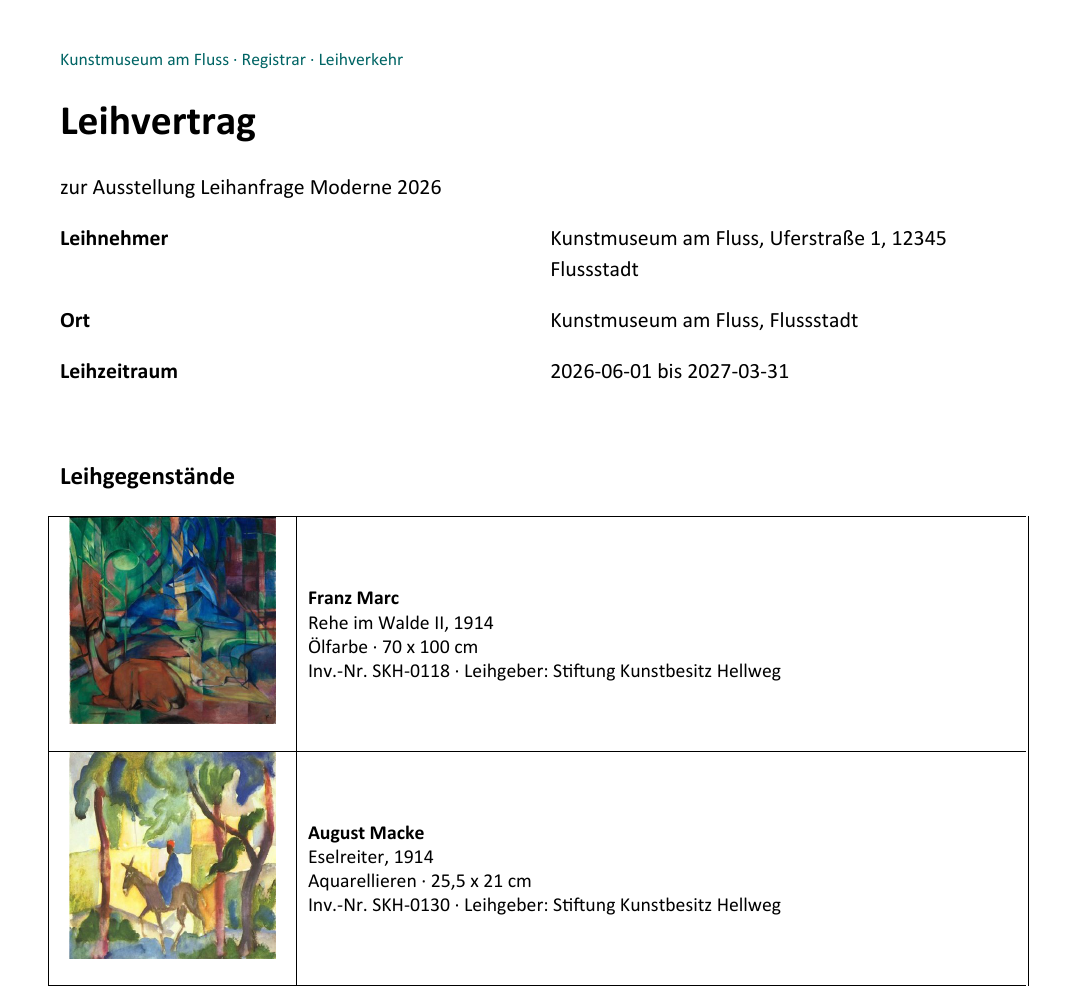
The demo template Leihvertrag (loan agreement) is built on the same pattern, with an object photo for each loan:
Object list as a table
A table with four rows: the header row, a row containing only the start of the loop, the data row and a row containing only the end of the loop. The data row is then repeated for each object. The demo template Objektliste (object list) is built this way.
Row 1:  No. | Image | Object | Dimensions
Row 2:  {# FOR obj IN objects #}          (first cell, the others empty)
Row 3:  Cell 1  {#$idx + 1#}
        Cell 2  {# IMAGE img(($obj[`Titelbild`] ?? null), { width: 3 }) #}{#$obj[`Titelbild`] ? `` : `ohne Abbildung`#}
        Cell 3  {#$obj[`RegNr`] ?? ``#}
                {#$obj[`Originaltitel`] ?? ``#}
        Cell 4  {#ffmt($obj, `Maße`) ?? ``#}
Row 4:  {# END-FOR obj #}                 (first cell, the others empty)
FOR and END-FOR sit in rows of their own above and below the data row. If you put them in the first
and last cell of the same row instead, the built-in engine repeats only the cells, not the row.
The fallback ohne Abbildung (no image) in cell 2 has a reason: if an object has no cover image, the
cell would stay empty, and the engine removes empty cells. With the text, the cell stays.
The order follows the sorting of the view. To sort differently, sort beforehand: {#! liste = _.sortBy(objects, o => o[`RegNr`]) #} and then FOR obj IN liste.
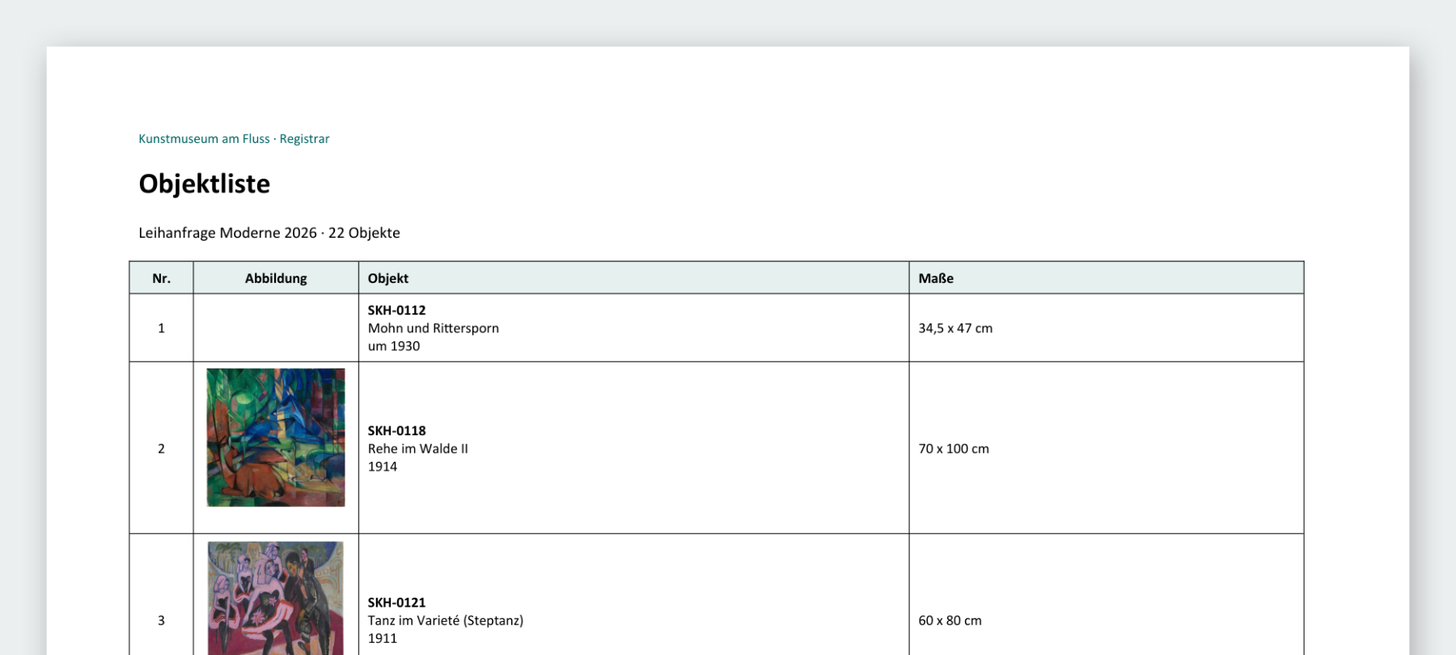
For the loan request Moderne 2026, the demo template Objektliste produces this table (start of the first page):
Condition report
One report per object with incoming and outgoing photos. In Moliri the photos carry the keywords EINGANG (incoming) and AUSGANG (outgoing). At the start of the document they become two named lists:
{#! eingang = $f.filter(d => d.keywords && d.keywords.split(`,`).map(s => s.trim()).includes(`EINGANG`)).sort((a, b) => (a.text ?? ``).localeCompare(b.text ?? ``)) #}
{#! ausgang = $f.filter(d => d.keywords && d.keywords.split(`,`).map(s => s.trim()).includes(`AUSGANG`)).sort((a, b) => (a.text ?? ``).localeCompare(b.text ?? ``)) #}

Zustandsprotokoll {#$o[`RegNr`] ?? ``#}, {#$o[`Originaltitel`] ?? ``#}
Eingang: {#fdate($o[`Eingangsdatum`]) ?? `offen`#}    Rückgabe: {#fdate($o[`Rückgabedatum`]) ?? `offen`#}
Zustand bei Eingang: {#$o[`Zustand Eingang`] ?? ``#}

{# FOR i IN _.range(0, Math.max(eingang.length, ausgang.length)) #}
{# IMAGE img(eingang[$i] ?? null, { width: 8 }) #}        {# IMAGE img(ausgang[$i] ?? null, { width: 8 }) #}
Abb. {#(($i+1)*2)-1#} {#eingang[$i]?.text ?? ``#}   Abb. {#($i+1)*2#} {#ausgang[$i]?.text ?? ``#}
{# END-FOR i #}
The map(s => s.trim()) matters. Without it, the comparison fails on a space after the comma. ?. and ?? null catch the case where one list is shorter than the other. The report uses only $o and $f, so
one document is created per object. A suitable section behaviour is Insert section break (new page).
In the template editor, Structures › Images & files › Two image lists side by side inserts this pattern with keywords of your choice.
Dimension line with fallbacks
If the dimensions field has an output formatter, {#ffmt($o, `Maße`)#} with a fallback is enough.
Otherwise, here are three common variants with separate fields, from simple to robust:
… simple, empty values disappear:
{#$o[`Hoehe`] ?? ``#} x {#$o[`Breite`] ?? ``#} x {#$o[`Tiefe`] ?? ``#} cm

… with a dash for missing values and optional depth:
{#$o[`Breite`] ? imask($o[`Breite`], FLOAT_FORMAT)+` cm` : `-`#}{#$o[`Tiefe`] ? ` x `+imask($o[`Tiefe`], FLOAT_FORMAT)+` cm` : ``#}

… join only the values that exist, unit only when something is there:
{#combine([parseFloat($o[`Hoehe`]), parseFloat($o[`Breite`]), parseFloat($o[`Tiefe`])].filter(Boolean).join(` x `), { post: ` cm` })#}
The same filter(Boolean).join pattern works for name and location lines:
{#[$o[`Kuenstler_Vorname`], $o[`Kuenstler_Zuname`]].filter(Boolean).join(` `)#}
{#[$o[`Standort`], $o[`RaumNr`], $o[`Wand_Nr`], $o[`Vitrinen_Nr`]].filter(Boolean).join(` / `)#}
Define a number format once
At the start of the document; after that you can use it anywhere as imask($o[`Feld`], FLOAT_FORMAT):
{#! FLOAT_FORMAT = { "mask": "Number", "scale": "2", "thousandsSeparator": " ", "radix": "," }#}
Grouping: a heading for each room
{#! gruppen = _.groupBy(objects, o => o[`RaumNr`] ?? `ohne Raum`) #}
{# FOR key IN Object.keys(gruppen) #}
Raum {# $key #}
{# FOR obj IN gruppen[$key] #}
{# $obj[`RegNr`] ?? `` #}, {# $obj[`Originaltitel`] ?? `` #}
{# END-FOR obj #}
{# END-FOR key #}
gruppen is built from objects, and the loop runs over gruppen. Moliri recognises this as a loop over
the objects and creates one document.
Images for each object in one report for all
{# FOR obj IN objects #}
{# INS $obj[`RegNr`] ?? `` #}
{# FOR file IN files[$obj.object_id] #}
{# IF [`image`, `image_other`, `svg`].includes($file.kind) #}
{# IMAGE img($file, { width: 6 }) #}
{# END-IF #}
{# END-FOR file #}
{# END-FOR obj #}
$f does not follow the inner object loop. Inside FOR obj IN objects you write files[$obj.object_id].
A count with the right plural form
{#objects.length#} {#pluralize(`de`, objects.length, { one: `Objekt`, other: `Objekte` })#}
objects.length also works in a per-object template and does not change its mode.
Link back into the application
Jump straight from the report into the image comparison, in the condition report above inside the loop:
{# LINK ({ url: `https://beispiel.moliri.app/p/${p.project_id}/o/${$o.object_id}/compare?left=${eingang[$i] ? eingang[$i].file_id : null}&right=${ausgang[$i] ? ausgang[$i].file_id : null}`, label: `Vergleich öffnen` }) #}
p.project_id and $o.object_id make the link right for each object. Put the address of your own
instance in place of beispiel.moliri.app.
Output events
{# FOR ev IN $e #}
{# IF $ev.type === `ausstellung` #}
{# INS $ev.title #}{# INS combine($ev.role, { pre: ` (Kat. `, post: `)` }) #}, {#fdate($ev.date_from, `JJJJ`)#}
{# END-IF #}
{# END-FOR ev #}
Output a switch field
Kurierbegleitung: {#fcheck($o[`Kurierbegleitung`], `Ja`, `Nein`)#}
A fixed label is the safe choice for documents that are archived. Without the two arguments, the values come from the view settings of the person exporting, and the document looks different for everyone.
Make a field visible
If a field is only used in a way Moliri does not recognise (for example as a string in _.groupBy(objects, `Leihgeber`)), it is not loaded. A condition that never runs makes it visible:
{# IF false #}
{# INS $o[`Leihgeber`] ?? `` #}
{# END-IF #}
Common pitfalls
- In loops always write
$file,$obj,$ev,$i, never without the dollar sign. - Backticks instead of straight quotation marks.
- With nested object loops, do not assume that
$fpoints to the inner object. - In loops use
ffmt($obj, …)rather than$fmt[…]. - For nested access use
?.rather than.. - For complex logic, a preparatory command at the start of the document is better than nested one-liners.
Further reading
- Template functions : all ten helpers
- Template variables : the data context
- Create a Word template : the starting point