
Word templates
Output formatters in templates
A field can carry an output formatter in its configuration: a rule that turns the stored raw value into a readable form. A dimensions field becomes “118,5 × 64 × 21 cm”, an address becomes a single line. For templates this means the formatting is defined once on the field rather than in every command.
The raw value always stays within reach. $o[`Maße`] outputs it, ffmt($o, `Maße`) the formatted
form.
In the examples on this page, Maße (dimensions) is an assumed dimensions field with entries such as
“Objekt” (object). The demo collection has no field of this name; there the dimension fields are called Breite, Höhe and Tiefe (width, height, depth), and ffmt($o, `Breite#einheit`) returns
something like “118,5 cm”.
The two notations
| Notation | Applies to | Remark |
|---|---|---|
ffmt(record, `key`) | Everywhere, including loops | The template editor always inserts this form |
$fmt[`key`] | The current object only | Wrong in a loop over objects, see below |
{#ffmt($o, `Maße`) ?? ``#}
{#$fmt[`Maße`] ?? ``#}
{# FOR obj IN objects #}{#ffmt($obj, `Maße`) ?? ``#}{# END-FOR obj #}
If nothing is formatted, both return null. The command then stays empty, and a fallback with ?? applies, as with fdate and imask.
$fmt belongs to the current object. A template with a loop over objects renders exactly once,
with the first object as the current one. There, $fmt shows the values of the first object in every
row. ffmt($obj, …) takes the object as an argument and is therefore right inside the loop too. If you
write ffmt everywhere, you cannot get it wrong.
The key
The key starts with the field name. A full stop selects an entry, a hash selects a variant:
| Key | Result |
|---|---|
Maße | Base variant, whole field |
Maße.Objekt | Base variant, only the entry “Objekt” |
Maße#kurz | Variant “kurz” (short), whole field |
Maße#kurz.Objekt | Variant “kurz”, only the entry “Objekt” |
Entries exist only in JSON fields ; after the full stop comes the label of the entry.
The base variant is the one with the ID standard or, if there is none, the first one in the field
configuration. If a formatting is added later, ffmt($o, `Maße`) in an existing template therefore
keeps outputting the same thing. An unknown ID returns null; it does not silently fall back to the base
variant.
A field name may contain a full stop: ffmt($o, `Inv.Nr.`) works, because Moliri first checks the
whole key against the field list. A hash is not allowed in field names, so that it can never hide a
variant.
On the formatter you can set which variant is preselected in views and export dialogs. That affects only those switches. In a template, the key alone decides; without a hash it is always the base variant.
Built-in formatting for each field type
Each field type brings a formatting with it (since v1.4.23 also 3D, HTML, time, link, the select fields, keywords and authority record). A field can add variants of its own or replace a built-in one with the same ID. The table shows the state as delivered; what a field in your project actually carries is in its configuration.
| Field type | Variant (ID) | Result |
|---|---|---|
| Number (decimal, integer) | Number (standard) | Only the number, according to the field’s mask |
Number with unit (einheit) | Number and unit, for example “118,5 cm” | |
| Date | Date DD.MM.YYYY | Incomplete dates shortened, for example “03.2025” |
| Switch | Label | The field’s on or off label |
| Address | Address on one line | Institution, person, street and number, postcode and town |
| Geolocation | Place on one line | The place on a single line |
| JSON | Entries on one line | All entries on a single line |
| Image, file, audio, video, panorama, 3D | File title | Title, otherwise description, otherwise ID and extension of the file |
| HTML | Text only | The text without markup |
| Time | Time HH:MM | Hours and minutes |
| Link | Without protocol (standard) | The address without https:// |
Domain only (domain) | Only the host name | |
| Select with hierarchy | Lowest level only | The last term of the path |
| Select, keywords | Separated by a middle dot | Several values joined with ”·” |
| Authority record | Label only (standard) | The name of the term |
Label with source (quelle) | Name and origin |
The ID is given only where a field type brings more than one variant. Only then does the key need a hash: ffmt($o, `Breite#einheit`).
For a number field, the base variant “Number” now outputs only the mask. The unit is in the second
variant “Number with unit”. Templates that relied on the unit in ffmt($o, `Breite`) now need ffmt($o, `Breite#einheit`).
Choose the formatting when inserting
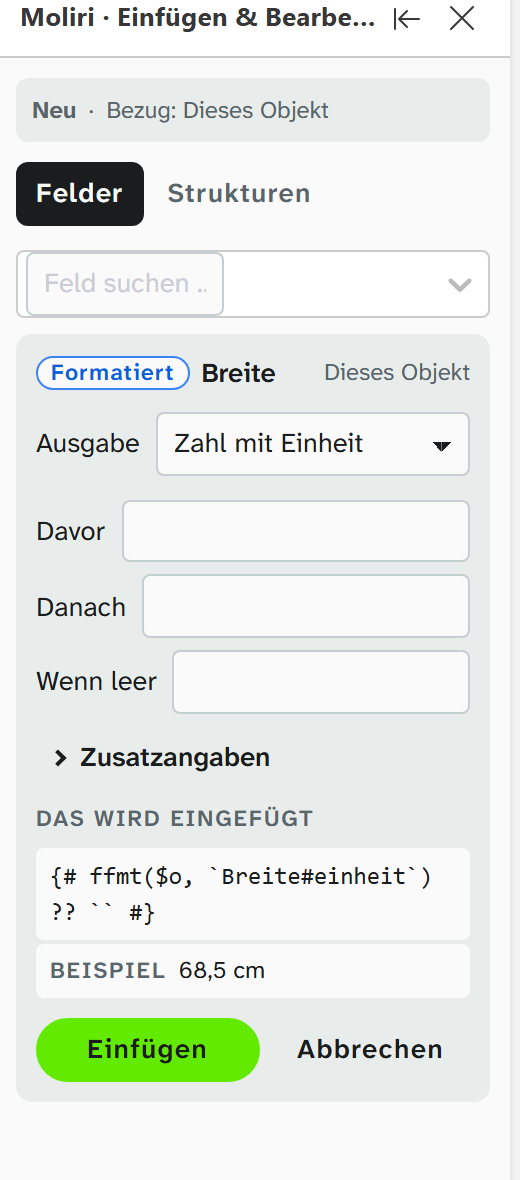
In the template editor, when you insert a field, the panel Moliri · Insert & edit offers under Output the choice
between Raw value and the field’s formattings, for Breite for example Number and Number with unit. The choice appears only if the field has an output formatter. Under This will be inserted you see the finished command, and below it a sample value if there is one. The
panel writes the ID itself. The Word add-in does not offer this choice; there you write ffmt by hand.
Maintaining formatters
Formatters are created and changed in field management (field, section Output formatter) and, for each field type, in field type management. That is a task for the setup, see Field configuration . A formatter sees only the value of its own field. To calculate across several fields, use a virtual field .
The check in the template editor detects typing errors in formatter keys.
Further reading
- Template variables :
$o,$fmtand the other data - Template functions :
ffmtalongside the other helpers - Field types : raw value and formatting from the data entry point of view