
Authority data along the way
How collection data can be structured without holding up exhibition work. Under this title, Moliri, the database for collection, conservation and exhibition, presents itself at the Herbsttreffen (autumn meeting) of the documentation working group of the Deutscher Museumsbund, the German Museums Association.
Research becomes a decision per term instead of per cell.
Lender lists in many spellings
Exhibition data is created under time pressure. Loan agreement, transport, insurance, customs and arrival all have to work, and at no point in this chain is authority data the question.
Lenders send Excel lists. In them, the same artist appears as “Kirchner, E. L.”, as “Ernst Ludwig Kirchner” and as “E.L. Kirchner”, and the material once as “Öl auf Leinwand” and once as “Öl/Lwd.” (oil on canvas, written out and abbreviated). None of it arrives as LIDO.
If you research these lists again cell by cell, you hold up the installation. If you take them over unchecked, you end up with five spellings in the collection. With Moliri, the structure is created during the import and not in a second pass.
The pitch
- TitleAuthority data along the way: how collection data can be structured without holding up exhibition work
- EventBerliner Herbsttreffen zur Museumsdokumentation, documentation working group of the Deutscher Museumsbund
- Date5 to 7 October 2026
- Conference themeDocumentation as a key driver of sustainable knowledge management
Take over the list, park what is unclear
Moliri takes over the lender's Excel list and maps the columns to fields by their headings. Images in the file become the cover images of the objects. If the GND number is in a neighbouring column, a column function brings it forward.
Moliri writes nothing unclear into an authority data field. Values that cannot be matched unambiguously are parked and carry the label “to resolve”. The objects are created all the same, and work on the exhibition goes on.
Decisions are made per term, not per cell
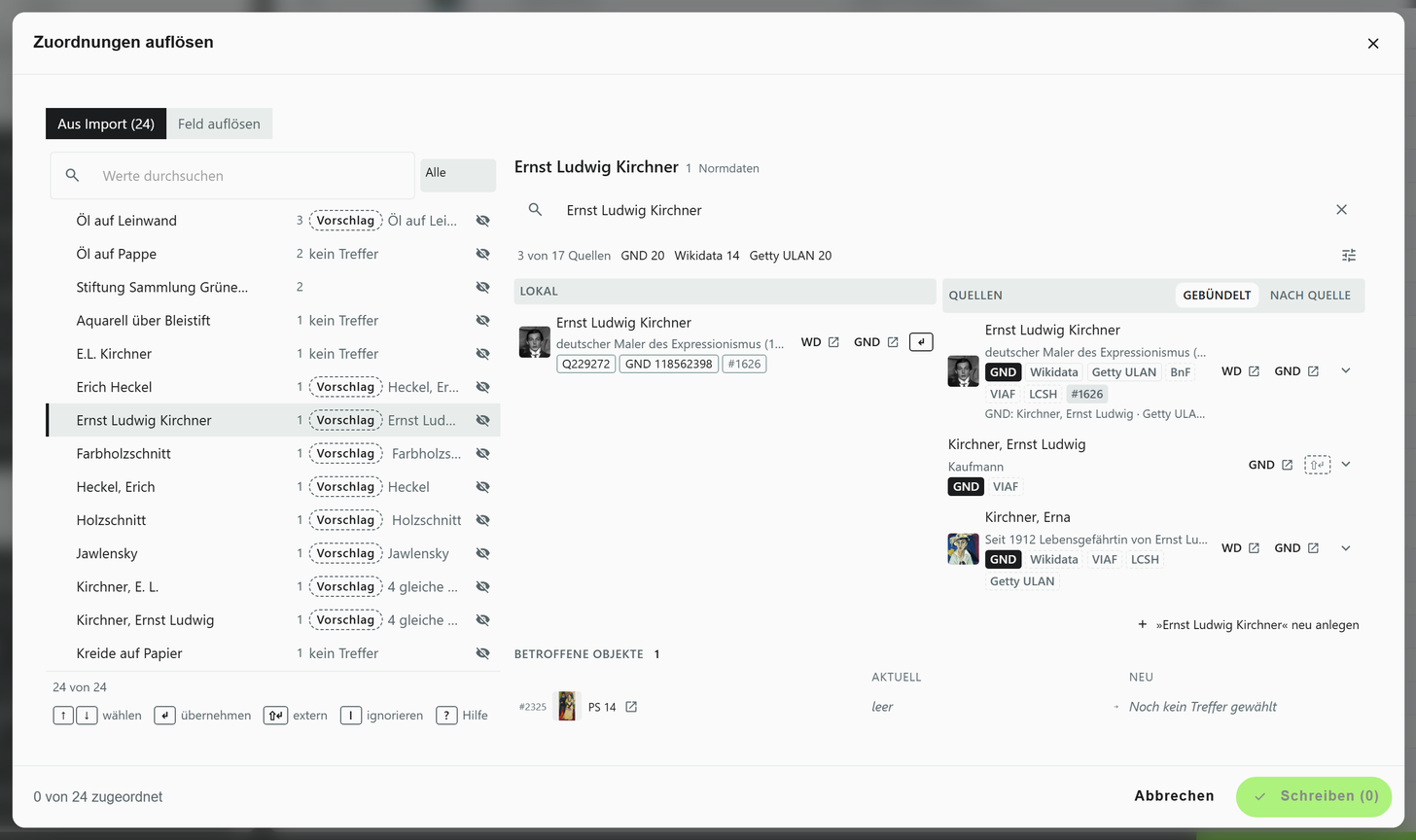
Under “Resolve references”, Moliri collects the parked values, sorted by frequency, with the objects concerned next to them. The registrar decides there once per term. The matches come from GND, Wikidata, Getty, Iconclass and other sources. If several sources describe the same person, they appear as one candidate, merged only by identifiers and never by names that sound the same.
Moliri suggests, a person confirms. The decision stays with the registrar, even when two people share a name.
Once a term has been resolved, it sits in the library with its identifier. If a cell in a later delivery carries the same identifier, Moliri matches it to this entry. If the same name comes back in the same spelling, the resolved term is offered as a suggestion.
Save, deliver, trace
Saving always works. If a required entry is missing or a value breaks one of your institution's rules, Moliri saves it anyway and marks the gap. That way you can still catalogue shortly before the opening.
Each field is mapped once to a concept such as “material” and then delivers to every standard that uses it. Before the export, a check report shows which required entries for the Minimaldatensatz (minimum data set) are missing and for which objects. The schema check runs in the browser, so the data does not leave your institution for it.
For every change, Moliri stores the person, the time and the project. The changes of an entire import can be undone in one step.
Import, sources, standards
- ImportExcel files (.xls, .xlsx) with column mapping, preview and images
- SourcesGND, Wikidata, Getty, Iconclass and others
- StandardsLIDO 1.1, DDB-LIDO, Minimaldatensatz, EODEM, Dublin Core
- HistoryEvery change with person and time, can be undone singly or for an entire import
Slides for the pitch
The slides are in German and run directly in your browser. Use the arrow keys to move on; the first slide explains all the keys.
The keys work once you have clicked into the slides. On a phone or tablet, swipe to move through them. In a window of their own, the slides have more room.
See Moliri with a lender list of your own
Bring an Excel list along, anonymised if you prefer. In the demo we use it to show the way from the import to the decision per term.