
Collection management
Collection management procedures in Moliri
Moliri comes with a template for every collection management procedure. A template names the information the procedure needs and sorts it into mandatory, recommended and optional. It creates missing fields, the link types and an input form. The selection and the information follow the common standards of museum documentation. How an institution runs through the procedure is up to the institution.
The templates are under Data model › Metadata standards in the section Processes, each as a card of its own below the export standards. They are built on the same concepts as LIDO and the Minimaldatensatz (minimum data set, MDS): a field that is mapped for the export also counts for the template.
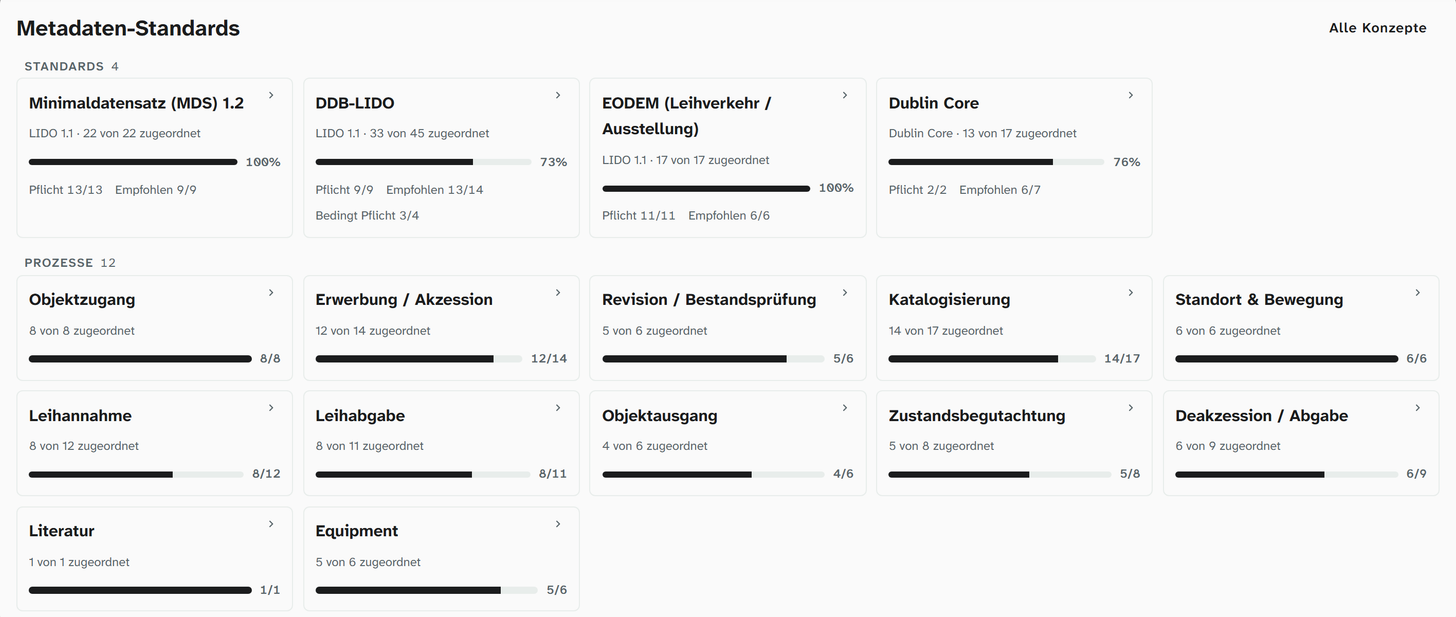
The path of an object
| Procedure | Purpose | Template | Mandatory | Also in Moliri |
|---|---|---|---|---|
| Object entry | An object arrives at the institution before a decision on its future has been made | Object entry | Inventory number, object title | Owner and contact from the address book |
| Acquisition | Ownership of the object passes to the institution and it is accessioned | Acquisition / accession | Inventory number, object title, acquisition method, event | Event of the type acquisition, lot |
| Cataloguing | The object is documented in scholarly depth | Cataloguing | Inventory number, object title | Authority data, references to literature and other objects |
| Location and movement | Where the object is and where it returns to | Location & movement | Inventory number, current location, event | Places as authority data, event of the type location |
| Inventory | The collection is checked against the documentation | Inventory / stocktake | Inventory number, object title, current location | Link Checked on an event |
| Loan in and loan out | An object comes into the institution for a limited time or leaves it for a limited time | Loan in, loan out | Inventory number, object title, loan partner, event | Loan as a project and as an event, loan agreement as a Word template |
| Condition check | Condition and damage are recorded | Condition check | Inventory number, condition | Condition photos, examination and treatment as events |
| Object exit | An object leaves the institution | Object exit | Inventory number, exit method, event | |
| Deaccession | An object is permanently removed from the collection | Deaccession / disposal | Inventory number, exit method, event |
Every template starts with the identification group (inventory number, object title, usually object type). The tables below list only what comes on top of that.
Using a template
Open the template, Install. The preview lists what will be created: missing link types and a layout template from the mapped fields, which appears in new projects. Concepts without a field are listed below, with Create missing fields. Existing fields stay as they are. If a layout with the template’s name already exists, no new one is added. Moliri creates everything in one go or nothing at all. Log shows who installed which template and when.
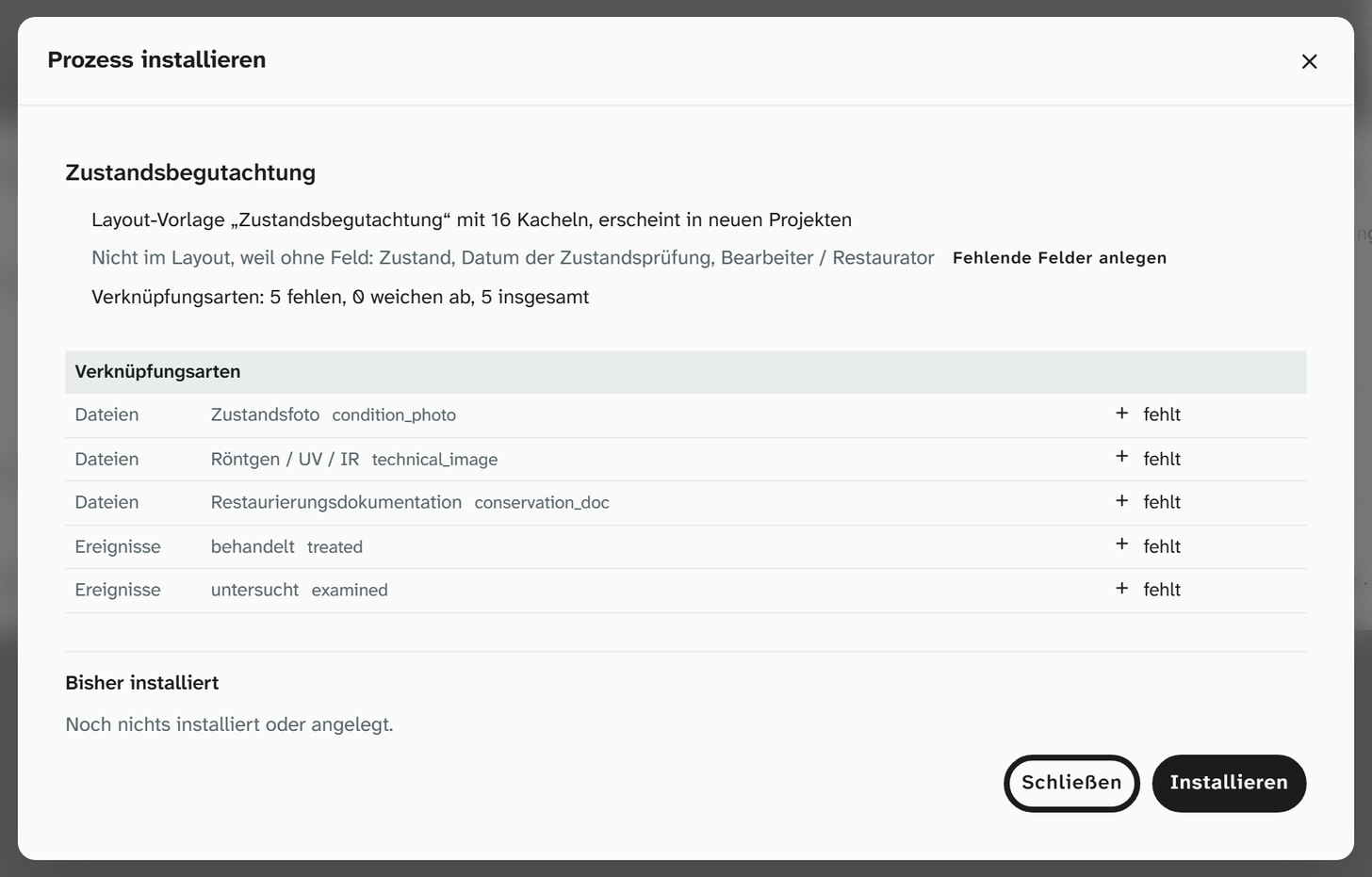
The levels apply to the template, not to saving. If a mandatory piece of information should stand out in the input form, the field gets the condition not empty, as for the Minimaldatensatz . If a mandatory concept lacks it, Set condition in the notice in the concept details sets it. The record is saved anyway.
Instructions: Bind fields to standards .
Object entry
Documents the arrival of an object: identify it unambiguously and record its arrival before a decision on its future has been made, for example for a gift offered for inspection or a find.
| Group | Information | Level |
|---|---|---|
| Description | Object description | Recommended |
| Object history | Event | Recommended |
| Administration | Holding institution | Recommended |
| Administration | Record date | Optional |
| Media | Media file | Optional |
Links: Owner and Contact from the address book, plus the file role Main image. You create objects that do not yet belong to the collection in a project of their own, for example “Entry”; a creation rule makes sure they do not appear in the collection (Create a project ).
Acquisition
Transfer of ownership and accession: record the method of acquisition, the source and the rights.
| Group | Information | Level |
|---|---|---|
| Acquisition | Acquisition method (purchase, gift, long-term loan, find, bequest …) | Mandatory |
| Acquisition | Previous owner / source | Recommended |
| Acquisition | Acquisition date | Recommended |
| Acquisition | Provenance | Optional |
| Production | Creator / maker, dating | Recommended |
| Dimensions | Dimensions | Recommended |
| Object history | Event | Mandatory |
| Administration | Rights in the object / work | Recommended |
| Insurance | Value / insurance value | Optional |
| Administration | Holding institution | Optional |
The acquisition itself is an event of the type acquisition, with date, participants and all objects that came with it (link Acquired). A lot is formed by the links Member of lot on the object and Part of lot on the event. The link Owner from the address book connects the previous owner.
Cataloguing
The full scholarly documentation. All export standards draw on it; if you have mapped fields for the Minimaldatensatz , you already have most of the fields.
| Group | Information | Level |
|---|---|---|
| Classification | Classification | Recommended |
| Classification | Subject keyword | Optional |
| Description | Object description | Recommended |
| Description | Inscriptions / marks, distinguishing features | Optional |
| Production | Creator / maker, dating, material, technique | Recommended |
| Production | Place | Optional |
| Dimensions | Dimensions | Recommended |
| Object history | Event | Recommended |
| Media | Media file | Recommended |
| Administration | Rights in the object / work | Optional |
Terms come as authority data with an identifier: object name, classification, material, technique, subject, depicted persons and places, style / period, mark / signature, provenance mark. References to other records use Part of, Related to, Documented in, Depicted in and Reproduced in; literature is kept as a library of its own, created with the template Literature. For images there are the file roles Main image, View, Detail, Back and Catalogue image, as keywords on the file (File roles ).
Location and movement
Where an object is right now, where it belongs, and which moves it has been through.
| Group | Information | Level |
|---|---|---|
| Identification | Object title | Recommended |
| Location | Current location | Mandatory |
| Location | Normal location | Recommended |
| Object history | Event | Mandatory |
| Media | Media file | Optional |
Locations are terms in the authority data library : building, room, shelf, compartment, each as a term of its own. They are linked as Current location and Permanent location. A move is an event of the type location, to which all objects that were moved together are linked. The history shows who changed the location and when.
Inventory
Knowing what you have and where it is: the collection is checked against the documentation.
| Group | Information | Level |
|---|---|---|
| Location | Current location | Mandatory |
| Condition | Condition | Optional |
| Media | Media file | Recommended |
You can record an inventory as an event, with the checked objects attached to it through the link Checked. A filter on this link shows which objects are still missing. For work in the store, a view with inventory number, location and image works well, as a table or in the gallery.
Loan in and loan out
Loan in: an object belonging to another owner comes into the institution for a limited purpose. Loan out: an object of your own goes to another institution for a limited time. Both templates are built the same way.
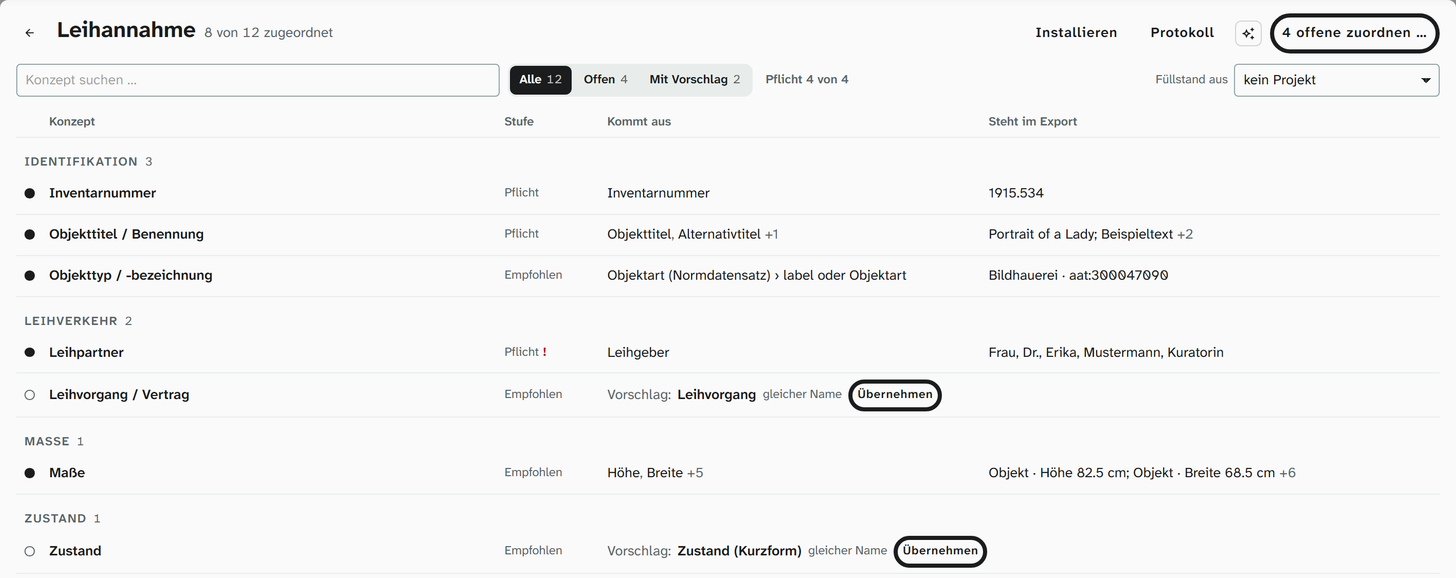
| Group | Information | Level |
|---|---|---|
| Loans | Loan partner (lender for a loan in, borrower for a loan out) | Mandatory |
| Loans | Loan / agreement | Recommended |
| Dimensions | Dimensions | Recommended |
| Condition | Condition | Recommended |
| Insurance | Value / insurance value | Recommended |
| Insurance | Insurer / policy | Optional |
| Object history | Event | Mandatory |
| Administration | Rights in the object / work | Optional (loan in only) |
| Media | Media file | Optional for a loan in, Recommended for a loan out |
In Moliri a loan has three sides:
| What | How | Purpose |
|---|---|---|
| Project | One project per loan request or exhibition | A workspace with views of its own, loan status as a project-specific value, kanban by status |
| Event | An event of the type loan, with all objects attached as Loaned object | The loan stays in the object history, even after the project has ended |
| Address book | For a loan in, the lender as Owner; for both, the other party as Contact | Maintain the contact once, use it in the agreement and in lists |
Loan agreement, loan list and condition report are produced with Word templates from the data of the selected objects. Documents about the loan are attached to the object and carry the file role Document as a keyword. For exchange with other institutions there is the export in the EODEM profile.
Information such as insurance, courier or agreement number is kept in fields on the object, not on the event.
Condition check
Record the condition and technical assessment: on entry and exit, before and after a loan, or at regular intervals.
| Group | Information | Level |
|---|---|---|
| Identification | Object title | Recommended |
| Condition | Condition | Mandatory |
| Condition | Condition description | Recommended |
| Condition | Date of condition check | Recommended |
| Condition | Examiner / conservator | Recommended |
| Production | Material | Optional |
| Media | Media file | Recommended |
Images get the file roles Condition photo, X-ray / UV / IR or Conservation documentation as keywords; Compare Images shows before and after side by side. Examination and treatment are events of the type conservation, with the object attached as Examined or Treated. For conservation work, an input form of its own that shows only this information is a good idea.
Object exit
An object leaves the collection the institution is responsible for: return of a loan, disposal, final exit.
| Group | Information | Level |
|---|---|---|
| Identification | Object title | Recommended |
| Exit | Exit method (return, transfer, deaccession, loss …) | Mandatory |
| Exit | Exit date | Recommended |
| Object history | Event | Mandatory |
| Media | Media file | Optional |
When a loan in is returned, the event is usually the loan itself, whose period ends.
Deaccession
An object is permanently removed from the collection following a set procedure. The template records what belongs to the justification.
| Group | Information | Level |
|---|---|---|
| Identification | Object title | Recommended |
| Exit | Exit method | Mandatory |
| Exit | Exit date | Recommended |
| Acquisition | Provenance | Optional |
| Insurance | Value / insurance value | Optional |
| Condition | Condition | Optional |
| Object history | Event | Mandatory |
| Media | Media file | Optional |
The record is kept. A deaccessioned object moves to a project of its own or gets a status that the views of the collection filter by. Every change remains in the history.
Supporting procedures in the institution
An institution maps how it runs through its procedures with the tools Moliri already has:
| Task | In Moliri |
|---|---|
| Order of the procedures | Each institution decides which templates it uses and in which order |
| Approvals and signatures | Status as a value list, kanban by status, history with name and time |
| Deadlines and reminders | Date fields, calendar with ICS file |
| Information per work step | Input forms per activity, permissions per group |
| Keeping an eye on mandatory information | Conditions mark gaps in the input form |
You can change a template freely after installing it. The template’s levels stay as they are and serve as a comparison.