
Libraries
Authority data
The shared collection of authority records for all projects: artists and other participants, places, object names, materials, techniques, keywords. A record is created once and used by any number of objects. An authority record field refers to it.
Details of a record
| Detail | Note |
|---|---|
| Label | The preferred form of the name. Appears in fields, filters and exports |
| Description | Short description from the source |
| Identifiers | Such as Wikidata Q5582, GND number, an identifier from the vocabularies of the Getty Research Institute. Further identifiers lists the others |
| Synonyms, Notation, broader term | As far as the source provides them |
| Image URL | Link to an image at the source |
| Raw source payload | The source’s response, the basis for the sync |
| Comment | Freely editable, for internal notes |
| Source | Where the entry comes from |
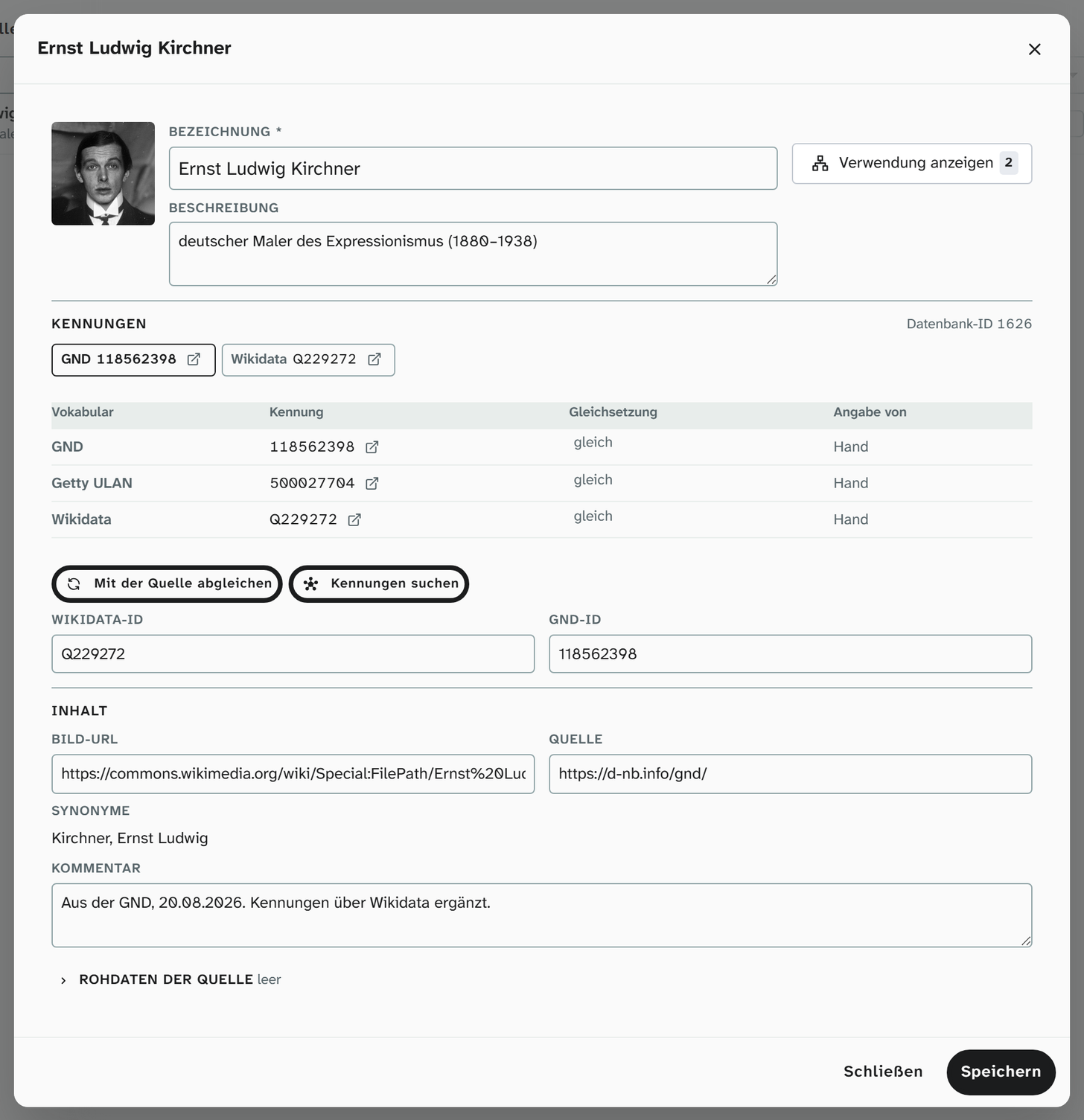
The label is what you see. The identifiers make an export connectable: in the LIDO export, an authority record field becomes a term with an identifier. See LIDO .
Sources
Which sources a field offers is set per field in its setup. In the interface they are arranged in groups:
| Group | Examples |
|---|---|
| Authority files | Gemeinsame Normdatei (GND, the German integrated authority file), Wikidata |
| Getty vocabularies | The vocabularies of the Getty Research Institute: Art & Architecture Thesaurus (AAT), Union List of Artist Names (ULAN), Thesaurus of Geographic Names (TGN) |
| museum-digital | Objektbezeichnungsdatei (OBG, a German object name thesaurus) and the vocabularies of museum-digital |
| Subject classifications | Iconclass, Hessische Systematik, Hornbostel-Sachs classification, Thesaurus of the Technisches Museum Wien, iDAI.world Thesaurus, LIDO terminology |
| Places | GeoNames, iDAI.gazetteer |
| Own | The in-house list |
Which sources a field offers is set on the field in its setup. The default is GND and Wikidata. When searching, you can switch on more.
How entries are created
The usual route: search in the field and accept a hit. The search shows the entries that already exist on the left and the hits from the sources on the right, grouped either Bundled (the default) or By source. The row of chips above shows, for each source, whether it reported hits, found nothing, is switched off or could not be reached.
If several sources hold the same term or person, they appear as one bundled hit with all identifiers. Bundling is based on identifiers that refer to each other, never on identical names.
An internal hit is assigned immediately. A hit from a source opens a draft in which the details are checked:
| Button | Effect |
|---|---|
| Create & assign | Creates a new record and puts it into the field |
| Assign | The record already exists and is assigned |
| Update & assign | Takes the new details into the existing record and assigns it |
You resolve many values from an import together under Resolve references .
Entries without a source
Local people, in-house classification terms or previous owners from an estate are not in any authority file. Create without a source creates an entry with just the label. Identifiers, description and raw data can be added later.
Syncing with the source
Name forms, descriptions and identifiers change at the source. The sync fetches the current state of a record from the source it came from: GND, Wikidata, Getty, GeoNames and any other source whose identifier is on the record.
In the open record, Sync with source is below the identifiers, in the library as well as on the Entry tab of the dialog on the authority record field . The sync runs in the background. The form waits up to three minutes for the result and then shows it on the record. If it takes longer, Moliri reports The sync is still running in the background, and the result is there the next time you open the record.
What the sync writes and what it does not:
| Detail | Behaviour |
|---|---|
| Raw source payload, broader term | Replaced by the state at the source |
| Description, image, synonyms, language, GND and Wikidata identifier | Filled if they are empty |
| Label, description, image, synonyms with a value of their own | Stay as they are. If the source differs, the difference is offered for you to accept |
| Further identifiers | Are added, none is removed |
The result is shown in the form under Last sync with the date:
| Result | Meaning |
|---|---|
| All fields already match the source. | Nothing to do |
| The sync updated the record from its source. | Empty details were filled or the raw data renewed |
| Curated values differ from the source | One row per detail with the old and new value. Apply selection puts the ticked values into the form; they are saved with the record |
| Removed at source | The source no longer knows the record. It stays unchanged |
| Redirected to … | The source holds the record under a new identifier, and the record follows it |
| Duplicate | Another record already holds the identifier. You can merge the two in the library, see below |
| Sync failed | With the reason, such as Media service unreachable. The sync will be retried later. |
If the source is busy at the moment, Moliri says so and asks you to try again in a few minutes.
Entries created without a source (origin lokal or manuell, local or manual) have nothing to sync with and therefore no sync.
Fields that inherit from an authority record follow the sync: if it changes the record, the objects that use it are updated. A change made by hand to the record does not do this; for that, the setup has Apply to all objects.
Syncing the whole library
A record is due again 30 days after its last sync. Administrators (status 9) sync all due records at once, under Libraries › Files in the Upload workers dialog, row Authority sync. The row shows how many records are due and how many were changed, removed at the source or failed in the last 24 hours. Sync queues the run; it works through the due records in batches in the background.
Merging duplicates
Two records for the same person arise, for example, when one was taken from the GND and one from Wikidata before both identifiers were known. The sync recognises this as soon as both carry the same identifier. Merging turns them into one record: everything that points to one of them then points to the other, and the first is deleted.
The library shows recognised duplicates with the Duplicates selection. Both rows of a pair carry a merge icon on the right (Merge with “…”). It opens the comparison:
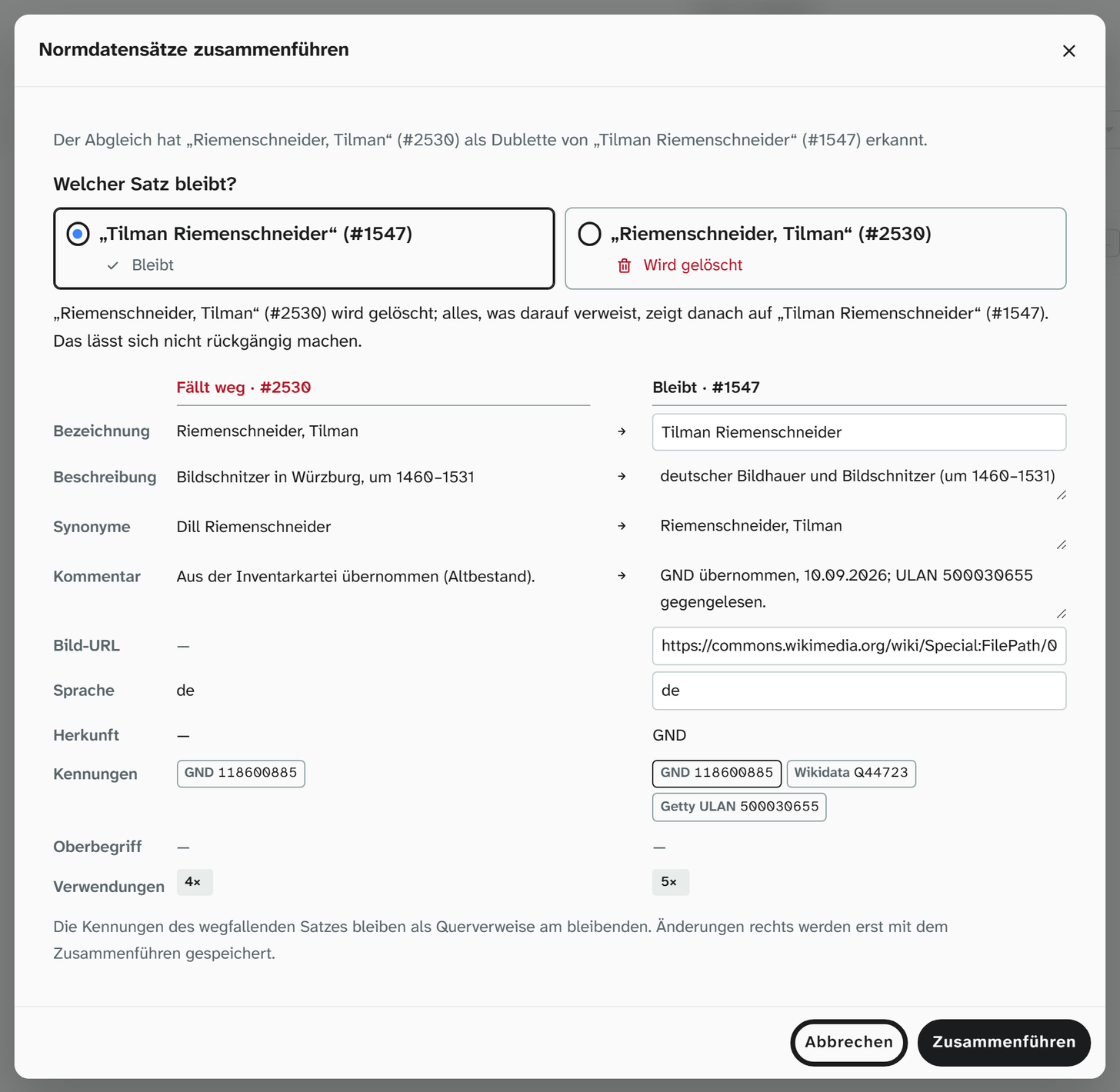
| Part | Content |
|---|---|
| Which record remains? | Both records to choose from. The suggestion is that the reported record is absorbed into the other one. Below it, one sentence says which record is deleted and what everything points to afterwards |
| Comparison | One row per detail, on the left Will be removed (red), on the right Will remain. Origin, identifiers as links, broader term and usages are shown for comparison |
| Details of the remaining record | Label, description, synonyms, comment, image URL and language can be edited here. The arrow takes over the value of the record being removed; for synonyms and comment it appends it |
The identifiers of the record being removed stay on the remaining one as cross-references. Changed details are only saved when the merge is carried out.
Merge first calculates a trial run and shows its result for confirmation: source and target, how many objects, field values, events and links are affected, which duplicate links are dropped, which identifiers disappear with the deleted record and which details are saved on the remaining record. The step affects the whole instance, across all projects, and cannot be undone. Only Merge in this confirmation carries it out.
Check › Similar values finds authority records that are spelled alike but share no identifier, on the Authority records tab. From there the same comparison leads to merging.
The library
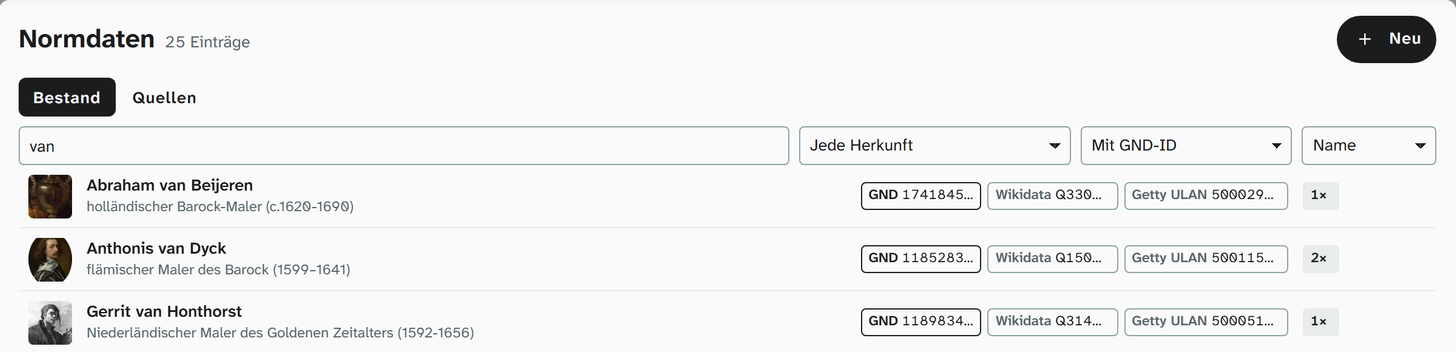
Under Libraries › Authority data (status 9), Records tab, all entries are listed. Each row shows image, label and description, next to them the identifiers as badges (such as GND, Wikidata, Getty ULAN), and on the right how often the entry is used. The Sources tab lists the instance’s sources.
Above the list are the search field Search authority data …, the Origin selection (Any origin or a source with the number of its entries), the selection by identifiers and notices, and the sort order:
| Selection | Shows |
|---|---|
| With Wikidata ID | Entries with a Wikidata identifier |
| With GND ID | Entries with a GND number |
| Incomplete (ID missing) | Entries without an identifier, such as those created without a source |
| Unused only | Entries that no object uses |
| Sync: notices | Entries for which the last sync reported something: removed at the source, duplicate, failed or differing curated values |
| Duplicates | Both entries of each recognised pair |
You can sort by name, usage or source. A click on an entry opens it as a dialog above the list, with all details, the identifiers and Sync with source. Show usage lists the objects and events there. Save applies changes.
If the last sync reported something, the row carries a notice icon. It opens the sync notices. There, Apply takes over a differing value from the source and Apply all takes all of them, each saved immediately; for a duplicate, Open duplicate and Merge are available there.
Under Check, Duplicate authority records and Authority records: notes from the sync take administrators (status 9) directly to the filtered library.
Terms held by a source cannot be rewritten here (Dieser Begriff wird in … gepflegt, hier ist nur die Bemerkung änderbar: this term is maintained in …, only the note can be changed here). You can always edit the comment.
Fields that inherit from the record
A field on the object can take over a detail from the authority record of another field, such as title and year of publication from a literature reference. An authority record field can also create the people of a reference (authors, editors) as links. How this looks on the object is described in Authority record , the setup in Fields .
Permissions
| Action | Permission |
|---|---|
| Search and assign in the field | Write access to the field |
| Sync a record with its source | Write access in the project or status 6 |
| Merge records | Status 6 |
| Library under Libraries | Status 9 |
| Sync the whole library | Status 9 |
Further reading
- Authority record : the field type
- Maintain authority data : the procedure
- Resolve references : resolving names from an import
- Events : participants in an event can be authority records
- Fields : setting up inheritance