
Reference
Project-specific values
An object can sit in the collection, in an exhibition and in a loan request at the same time and still be a single record. Its dimensions, images and history exist only once. Some values, though, only apply in one project: the exhibition title, the catalogue number, the loan status. For these, a field can hold a value of its own in each project.
| Term | Meaning |
|---|---|
| Base value | The shared value of the field. It applies in every project that has no value of its own |
| Project-specific value | A value that applies in one project only and overrides the base value there. Other projects keep seeing the base value |
The model behind this is explained in the background article Objects in several projects . Which fields get project-specific values is usually decided during setup; the procedure is described under Setting a project-specific value .
The scope bar
When an object is linked in more than one project, a bar appears above the object view. It shows Linked in n projects, next to it the number of project-specific fields on this object, and the choice of scope in which values are read and saved. For an object that sits in only one project, the bar is not shown.

| Scope (interface) | Reading | Saving |
|---|---|---|
| Hybrid (auto), default | Project-specific value if there is one, otherwise the base value | Into the project-specific value if the field has one here, otherwise into the base value |
| Current Project | as Hybrid | Always as a project-specific value of this project, also for fields that did not have one so far |
| Base Object | Always the base value | Always into the base value |
| Another linked project | As that project sees the object, including the link areas | Not possible, the scope is read-only |
The hints below the buttons read Edit fields in their existing context. (Hybrid), Edit only in this project context (Current Project) and Edit base values across all projects. (Base Object).
What happens when you save
| Scope | Field has its own value here | Result |
|---|---|---|
| Hybrid | yes | The project-specific value changes. Other projects are not affected |
| Hybrid | no | The base value changes. All projects without their own value see the change |
| Current Project | yes | The project-specific value changes |
| Current Project | no | A project-specific value is created. The base value stays and still applies in the other projects |
| Base Object | yes | The base value changes, but in this project your own value still covers it. The change is not visible here |
| Base Object | no | The base value changes |
| Another project | any | Nothing. The scope is read-only |
Hybrid on a field without its own value saves for everyone. This is the normal case and it is correct, but it reaches further than it looks: the correction applies in every linked project.
Base Object on a field with its own value stays invisible. The base value changes, while the project-specific value keeps covering it here. If you want to change the value in this project, use Hybrid (auto) or Current Project.
Markers and field details
In the field menu, Open field details leads to a dialog that shows all versions of the field side by side: first the current project, then the base value, then the other linked projects you are allowed to read. On the right are the colour, comment, source and “uncertain” of the selected version.
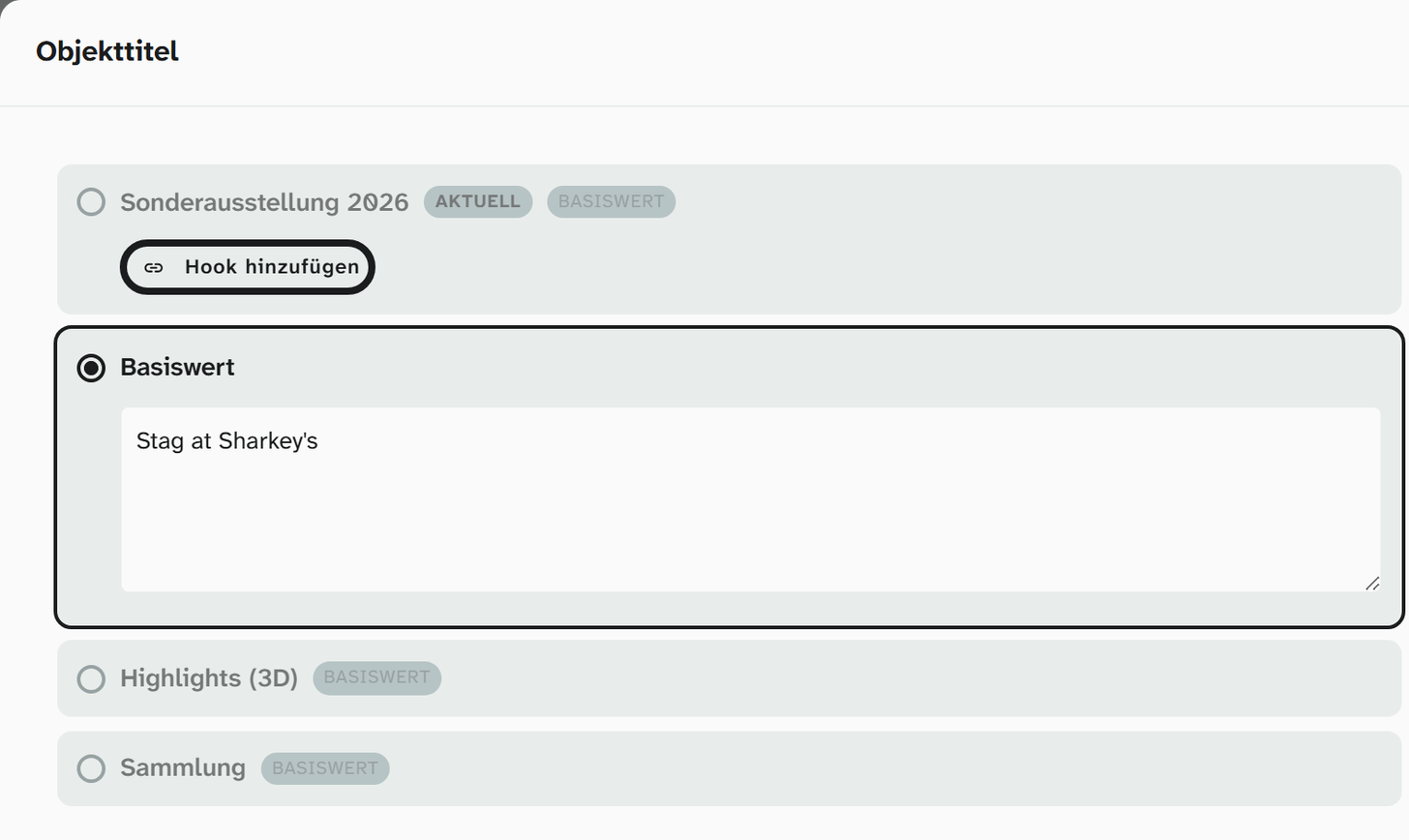
| Marker | Meaning |
|---|---|
| current | This row is the project you are working in right now |
| Base value | This row shows the shared value, or the project has no value of its own and takes over the base value |
A project row without this marker has a value of its own.
If the current project does not yet have its own value, its row shows the button “Add hook”. It copies the base value into this project as a project-specific value; from then on the value can be changed independently. You change the base value in the same dialog. The values of other projects can only be read here and are edited in those projects’ own view.
The interface does not currently offer a way to remove a project-specific value so that the project goes back to the base value.
Bulk edit
Bulk edit offers the same choice under the heading Save scope, with Hybrid (auto), Current Project and Base Object. It applies to the whole run: all changes made in one pass end up in the chosen scope.
A typical use of Current Project: giving every object in an exhibition a catalogue number without touching the collection.
History
A change is credited to the project in which it was made. The project history therefore shows changes to this project’s project-specific values and changes to the base values of its objects. See History .
Permissions
The scope does not change permissions. If you are not allowed to write a field, you cannot write it in any scope; if you can only read a project, you cannot create a project-specific value in it. Bulk edit reports write operations that fail for lack of access, with their number.
Further reading
- Linking an object to projects : the procedure
- Setting a project-specific value : one at a time and in bulk
- Objects in several projects : the model