
Setup: guides
Set a project-specific value
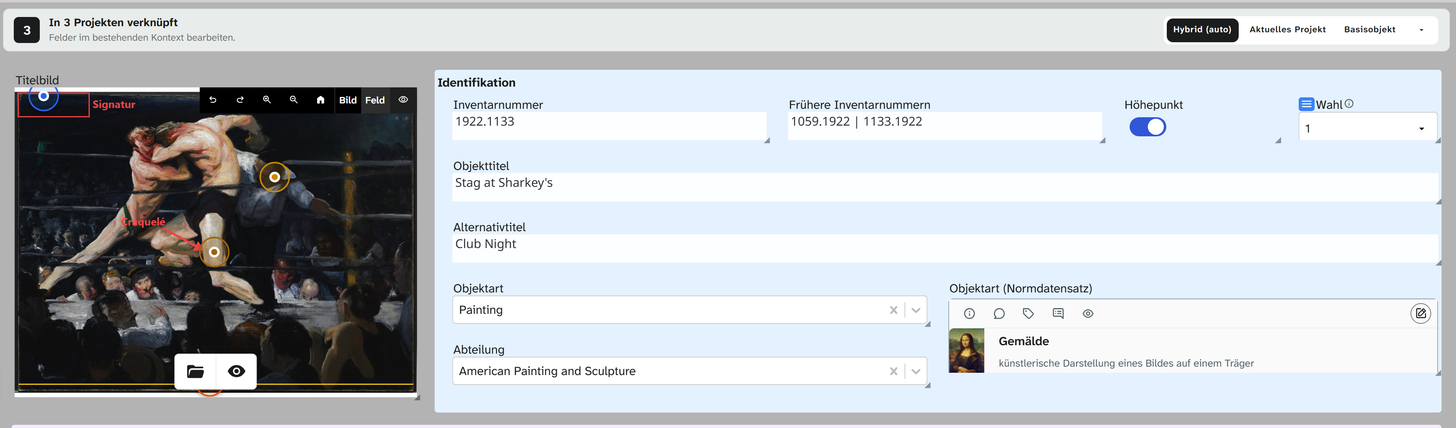
Some values do not belong to the object but to the object within a project: the catalogue number in an exhibition, the loan status during a loan. That is what the hook is for. It holds a separate value for one project, while the shared base value stays in place beside it. The user handbook calls this a project-specific value .
A hook requires the object to be linked to more than one project, and you must be allowed to edit the field.
Individually
-
Open the object in the project where the separate value should apply. Above the form is the scope bar with Linked in n projects. The number to its left gives the object’s project-specific fields (tooltip Hooked fields).
-
Open the field menu and choose Open field details. The row of the current project shows Add hook.
-
Click Add hook. The hook starts by taking over the base value, so nothing visible changes.
-
Change the value and save. From now on the hook and the base value go their separate ways.
The shorter way: choose Current Project in the scope bar and type. Every change then becomes a value that applies in this project only.
In bulk
The usual case: catalogue numbers for a whole exhibition.
-
Narrow the selection down to the exhibition objects.
-
Open the Batch editor.
-
Set the Save scope to Current Project.
-
Create the change and apply it. All values are stored as hooks in this project; the base values remain untouched.
The save scopes
| Scope | Writes |
|---|---|
| Hybrid (auto) | To the hook if the field has one in this project, otherwise to the base value |
| Current Project | Always to a value that applies in this project only |
| Base Object | Always to the base value; all hooks remain untouched |
| Other Projects (Read Only) | Nothing. Shows the object as another linked project sees it |
In bulk edit, the first three are available.
If you change a field in the Base Object scope that has a hook in this project, you change the base value. In the project, the form keeps showing the hook. To change the value in this project, use Hybrid (auto) or Current Project.
Conversely, Hybrid (auto) writes to the base value on a field without a hook. The change then takes effect in every linked project. That is the normal case and correct, just more far-reaching than it looks.
Always store a field in the project
If a field always belongs to the project, such as the loan status, nobody needs to think about the scope:
the Storage location on the field (project_scope) makes Hybrid (auto) write to a hook
(Preferably in the project) or makes every write do so (Always in the project). You find it in the
field details under Parameters. See Storage location .
Remove a hook again
The interface currently offers no way to remove a hook. If you want to see the base value in a project again, enter it in the hook. Earlier values are shown in the history .
When a hook is not the right tool
| Need | Better |
|---|---|
| A project does not need the field | Do not place the field on that project’s layout |
| A project needs an additional field | Create the field and place it on that layout only |
| A project needs a different select list | A configuration override per project . A different mechanism |
| The value really belongs to the object | No hook. Leave it shared |
Further reading
- Project-specific values : the user’s view with all cases
- Objects in several projects : the model
- Field configuration : the configuration hook