
Setup: guides
Set up the LIDO import
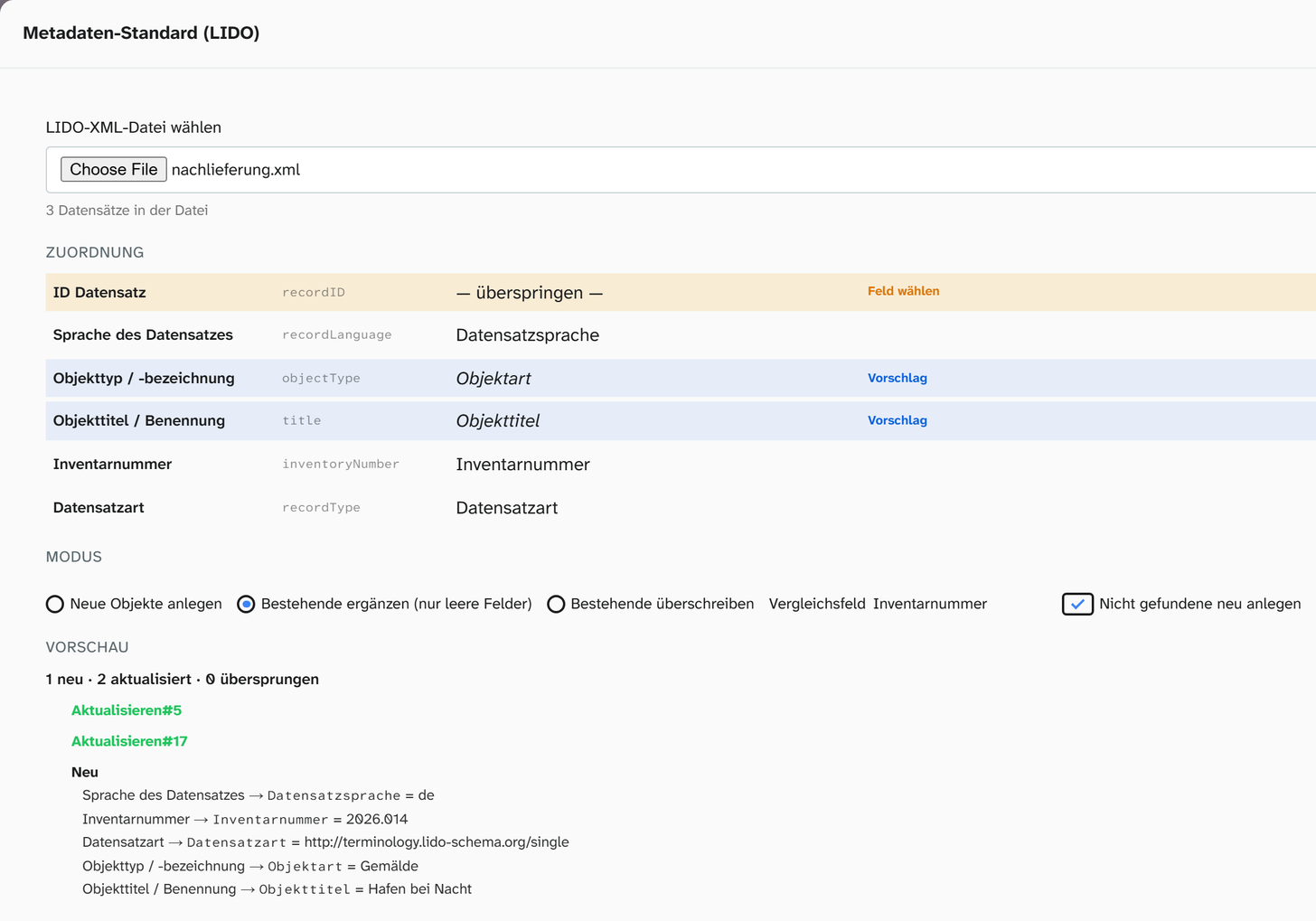
The LIDO import writes into the fields mapped to the concepts under Bind fields to concepts . You do not need to set up anything new for it. What a mapping provides by itself is preselected or suggested in the import dialog; everything else the users choose by hand during the import. How the import itself runs and what arrives is described under Import LIDO .
Fields
A concept is preselected if it is bound to exactly one field, directly and without any addition. Where the mapping reads from several fields, the dialog suggests one of them: the first source field that is not a subfield (so not, for example, the label of an authority data field). With several instances, the one marked preferred counts, otherwise the first. So the concept Material with the mapping “Material (authority record), otherwise Material” is set to the text field Material. The dialog marks it as a Suggestion; users check it and can change it. In the standards administration, the dialog of such a concept shows the sentence The LIDO import fills this in by itself only with exactly one field as the source; otherwise it suggests the first field of the sources, to be checked during import.
| Mapping | In the import dialog |
|---|---|
| Exactly one field, direct | Preselected and written |
| Concat, fallback or JS | The first source field without a subfield is preselected as a Suggestion |
| Several instances, or a language or preference tag as a separate facet | The first field of the preferred instance, otherwise of the first, is preselected as a Suggestion |
| Only subfields or virtual fields as sources, fixed value | Set to skip with the note Choose field |
| JSON field | Set to skip with the note Choose field |
| Link with a type, without a filter | Preselected as a Link; Moliri finds the target by its label |
| Event | Created as an event on the object, not in fields |
| No mapping | Set to skip with the note Choose field |
Where it says Choose field, you can assign the concept to a field by hand for this import; any suggestion can likewise be set to another field or to skip. So if you keep titles per language in a JSON field, you can export them, but on import you can only write them into a single field.
Measurements
Measurements go into the measurement fields when the concept Measurements has one instance per
measurement type: a fixed type (Höhe, Breite …) and the value directly from exactly one field. A
fixed extent (Objekt, Rahmen) counts too; a measurement in the file without an extent or with overall applies to the object. The import takes the unit from the field configuration (default_unit, units) and converts, also between mm, cm and m and between g and kg. It recognises the measurement
types in the file in German, in English or as a Getty AAT identifier.
Set up like this, Measurements shows Into the measurement fields in the import dialog, with the names of the fields. A measurement table in a JSON field cannot be reversed; then only the text of all measurements goes into a field the users choose.
Event types
An event from the file is only created when its type matches an event type of the project. The LIDO
identifier is the safest way: enter the LIDO terminology URI on each event type (such as http://terminology.lido-schema.org/lido00007 for production). The import then recognises the type by
the identifier in the file, however the file names it. Without an identifier, the name of the event
type and the official name in the LIDO terminology count.
EODEM files from loans usually need an event type for the change of physical control (lido00005);
otherwise the loan stays out. Moliri keeps the insurance value and typed notes such as handling in fields
of the object; the users map them to those fields during the import.
Names and media
Persons, corporate bodies and places with a GND number are linked to the authority record that carries this number, as a column, as a GND record or as an equivalent identifier of another vocabulary. If there is none yet, the import creates one with the number and the name from the file; syncing with the source fills in the rest. If two authority records carry the same number, the import does not link; merge such pairs beforehand under Merging duplicates . The name stays on the event as text in every case.
Names with another identifier (TGN, an in-house number) arrive as text only. You turn them into authority records in a second step. Images and media are assigned to the objects by the batch file import . Whether this route suits a particular LIDO collection is best clarified with Moliri beforehand at [email protected] .
Further reading
- Import LIDO : the import step by step
- Metadata standards : profiles, checks, import
- Bind fields to concepts : the prerequisite
- Export LIDO : the opposite route