
Reference
Field types
These pages describe how each field type is configured. What the people entering data see in the layout and how they enter values is covered in the user handbook under Field types . Each page here links to its counterpart there.
Field types are built into the program and cannot be created. What you create are fields, see Fields and Create a field .
Catalogue
The groups follow the selection you see when you create a field. The identifier is what appears there and under Field type in the field details.
| Group | Field type | Identifier | Page |
|---|---|---|---|
| Text | Text | text | Text |
| Formatted text | html | Formatted text | |
| Link | link | Link | |
| Numbers and measurements | Decimal number, integer | decimal, int | Number |
| Date and time | Date | date | Date |
| Time | time | Time | |
| Date and time | datetime | Date and time | |
| Selection | Select list | select | Select list |
| Selection tree | treeselect | Selection tree | |
| Hierarchical select list | treesvelecte | Hierarchical select list | |
| Switch | switch | Switch | |
| Links, authority data, addresses | Authority record | normdata | Authority record |
| Address | address | Address | |
| Geolocation | geolocation | Geolocation | |
| Object | object | Object | |
| Plan | plan | Wall planner | |
| Files and media | Image | image | Image |
| File | file | File | |
| 3D model | 3d | 3D | |
| Computed, JSON, custom code | JSON | json | JSON |
| JSON schema | json_schema | JSON schema | |
| Virtual field | virtual | Virtual field | |
| Template field | custom_text, custom_int, custom_decimal, custom_svelte_text, custom_svelte_int, custom_svelte_decimal | Template field |
The identifiers are English and lower case. That is how they also appear in exports and configurations.
No input form yet
These field types can be created, but the selection lists them with the note “no input form yet”. A field of this type only shows a locked text box with the raw value.
| Identifier | Use instead | Switch without data loss |
|---|---|---|
keywords | select with multiple and creatable, or normdata for a maintained vocabulary | to select, yes |
audio, video, panorama | file | yes |
number_formatted, number_labeled | decimal | yes |
The keywords of a file are something else: they belong to the file and can be reached through Bildfeld~keywords.
Parameters and the field type default
You maintain the configuration of a field in the field details under Data model › Fields:
| Section | Contents |
|---|---|
| Basics | Field name, field group, note, sample content, field type |
| Parameters | The keys of the field type as a form, plus the storage location that every field type has, with All parameters as JSON below |
| Field points to a link | The link type, for example for the object field |
| Output | Output formatters, see Formatting |
| Conditions | Required, uniqueness, custom rule, suspected duplicates |
| Cleanup | Steps before saving, see Cleanup |
| Custom code | HTML template or Svelte component of template fields |
| Permissions | Read and write permissions for everyone and per group |
| Usage | Projects, layouts and objects that use the field |
The tables on the field type pages state in the column If omitted what the field does when the key is missing. On top of that, every field type has a default, maintained under Data model › Field types as “Default parameters”. It applies only to fields without a configuration of their own. As soon as a field has its own parameters, only those apply. “Field type default” in the field details merges the keys of the default into the field’s own configuration if you want it to. The form under Parameters leaves a key out when its value matches the form’s default.
How the configuration is built, how a configuration hook overrides it per project and what happens with invalid JSON is described under Field configuration .
Formatting
A formatting (output formatter) is a second reading of the raw value: 1 234,50 cm instead of 1234.5, the postal address instead of the chain of identifiers. It takes effect in the gallery, table and
kanban, in the Excel export and in Word templates. Since version 1.4.23 every field type except text comes with at least one formatting:
| Field type | Formattings of the field type | Preselected in the views |
|---|---|---|
decimal, int | Number · Number with unit | no |
date | Date DD.MM.YYYY | no |
time | Time HH:MM | no |
datetime | Timestamp DD.MM.YYYY HH:MM | no |
switch | Label | no |
html | Text only | yes |
link | Without protocol · Domain only | no |
select, keywords | Separated by middle dots | no |
treeselect, treesvelecte | Lowest level only | no |
normdata | Label only · Label with source | yes (Label only) |
object | Short citation · Full citation | no |
address | Address on one line | yes |
geolocation | Location on one line | yes |
image, file, 3d, audio, video, panorama | File title | yes |
json | Entries on one line | no |
In exports the raw value stays preselected everywhere. Saved Excel presets and templates are not affected. Date, timestamp and switch are deliberately not preselected in the views either: there the display already follows each person’s own setting.
Field type and field
Formattings exist at two levels. The field type brings its own under Data model › Field types;
a field adds its own under Output. Both are merged by identifier: where the identifier is the same,
the field wins, and everything else from the field type remains available on the field. A new formatting of
your own therefore gets an identifier that is not yet taken. The variant standard is the one addressed by
the plain field name in templates; the others are called Feld#kennung.
The preselection can be set separately for each place and changed on a single field without copying the body of the field type’s formatter. An entry with an identifier and no body says exactly that:
JSON{ "output": [{ "name": "standard", "default": { "view": "raw", "export": "raw" } }] }
A formatter sees only its own field. The body runs in the same checked sandbox as virtual fields and conditions, see Virtual field . If it fails the check, there is no formatter; the column stays raw rather than wrong. Structure and examples are under JSON , their use in templates under Output formatters in templates .
Storage location
An object can be in several projects. A field value then usually applies everywhere, as the base value; a project can override it with a value of its own, see Set a project-specific value . The Storage location decides for each field where a value is written. Every field type has it; you find it under Parameters in the section Storage location.
| Storage location (in the form) | project_scope | Effect |
|---|---|---|
| Base (default) | missing | As before: Hybrid (auto) writes to the project’s value if it has one, otherwise to the base value |
| Preferably in the project | prefer | Hybrid (auto) always writes to a value of the current project and creates it if needed. Only the Base Object scope and the base value row in the field details still write the base value. Existing base values stay where they are |
| Always in the project | force | Every write goes to the project’s value, even in the Base Object scope. A write without a project is refused |
JSON{ "project_scope": "force" }
The rule applies to every route by which a value is written with a project: the object view, batch editing, the Excel import, a new object, cleanup, AI suggestions, copies. This keeps a loan status or catalogue number in the project, for example, even if the object is later linked into another project.
If you switch a field to Always in the project, saving asks Move values into the projects? and gives the number of base values. Move copies each of them into every project its object is in and then empties the base. Switching back does not move anything back.
Only the field’s own configuration counts; without one, the field type default applies. A project_scope in the hooks of a project override has no effect: the server decides the same way for
all projects. Inheriting and SQL migrations still write to the base.
Conditions
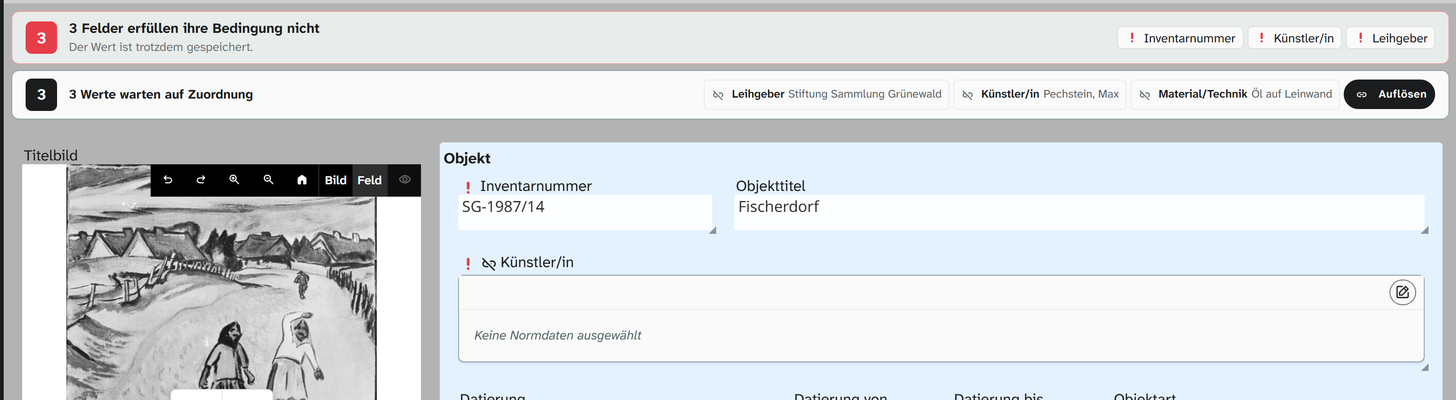
For every field type you can set four checks under Conditions: must not be empty, unique in the project, unique in the database, custom rule. A violated condition is a hint, not a block: the value is saved, the field shows a red exclamation mark, and a bar above the layout counts the affected fields of the whole object. Uniqueness compares text leniently (case and accents do not count); with compare strictly every character counts. Conditions are set only on the field, never in the field type default, and can be changed per project with a configuration hook. Details under Fields .
JSON{ "conditions": { "required": true, "unique": { "message": "Inventarnummer doppelt" } } }
Cleanup
Cleanup has a level for each field type: on the page Data model › Field types each field type shows its chain, with a test and Clean existing values for all fields of that type. Out of the box, all field types with text values remove whitespace at the edges, and integer and decimal number turn a decimal comma into a point. A field or a project can switch these steps off and add its own. See Cleanup .
Permissions
Read and write permissions are set in the section Permissions for everyone and per group; the higher permission applies. See Permission model . Specific to field types are:
| Field type | Special rule |
|---|---|
| Address | Assigning needs write permission on the field; creating and editing addresses needs permission on the address book |
| Authority record | editable controls which records may be changed in the form |
| Time | disabled locks input even with write permission |
| Virtual field | No permission of its own. Visible only to those who may read all sources |
Changing the field type
Under Basics a field type can only be switched to a field type with the same storage form; the interface offers only those. The values stay untouched.
| Storage form | Interchangeable |
|---|---|
| Text | text, select, html, link, switch, treeselect, treesvelecte, json, json_schema, keywords, custom_text, custom_svelte_text |
| Integer | int, custom_int, custom_svelte_int |
| Decimal number | decimal, number_formatted, number_labeled, custom_decimal, custom_svelte_decimal |
| Date | date |
| Time | time |
| Timestamp | datetime |
| File | image, file, 3d, audio, video, panorama |
Reference types (address, normdata, geolocation, plan, object) each stand alone. Interchangeable does not
mean equivalent: a switch becomes a select list with the values 1 and 0.
Choosing the right field type
| Question | Consequence |
|---|---|
| Will the value be filtered, sorted or grouped? | A field of its own with a suitable storage form. Numbers as decimal, dates as date; otherwise comparisons become text comparisons |
| Is the set of values limited? | select, not text. Free text produces variants (oil/canvas, oil on canvas) that can no longer be grouped |
| Does the set of values have levels? | Selection tree or hierarchical select list. They store the path and allow grouping per level |
| Does the term need an identifier and a source, for LIDO for example? | normdata |
| Does a structure repeat with a qualifier (title per language, dimensions per part)? | json. One field instead of twelve |
| Can the value be derived from other fields? | virtual instead of entering it twice |
A field Height (cm) with free text is a common cataloguing mistake. The right choice is a decimal field
with units: the value is stored in the base unit and shown in the chosen one. That keeps it comparable,
sortable and usable in calculations. See Number .