
Field types
JSON
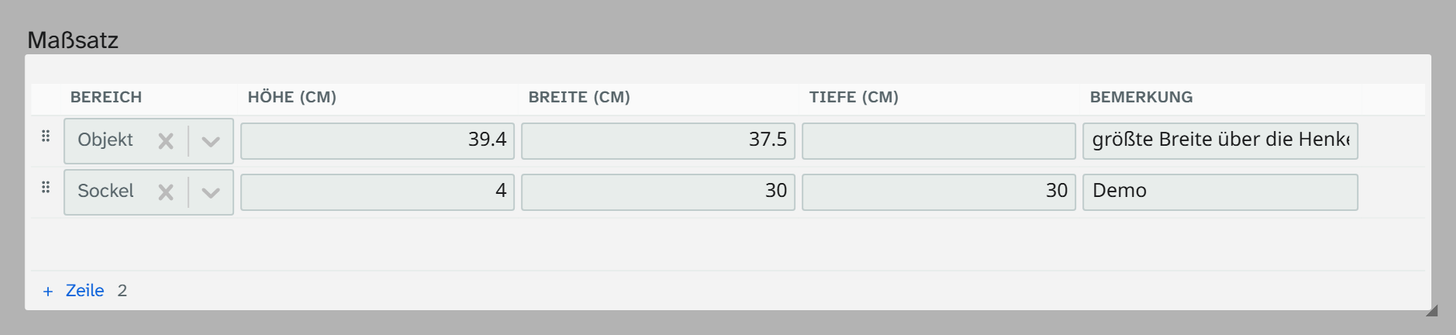
Field type json. A list of entries, each with a label and the same subfields. Data entry from the
cataloguer’s side is described under JSON .
The model
A JSON field has subfields (fields, the columns) and optionally labels (labels, the
entries). view decides only whether it is displayed as tabs or as a table; switching it moves no
data.
JSON{
  "view": "tabs",
  "labels": ["Objekt", "Rahmen"],
  "creatable": true,
  "max": 1,
  "fields": [
    { "key": "hoehe",  "label": "Höhe",   "type": "number" },
    { "key": "breite", "label": "Breite", "type": "number" },
    { "key": "tiefe",  "label": "Tiefe",  "type": "number" }
  ]
}
Parameters
| Key | Values | If omitted | Effect |
|---|---|---|---|
view | tabs, table | none | Display. Without this key the field shows “no fields configured” |
labels | List of strings | empty | The available entries. If the list is missing and creatable is off, there is no label level |
creatable | true, false | false | Create, rename and remove labels of your own |
show_all | true, false | true | Shows all configured labels, including empty ones. false: only filled ones, the rest through the plus |
max | Number or null | 1 | Entries per label. null means any number |
fields | List | empty | The subfields, the same for all labels |
output | Object or list | empty | Output formatter, see below |
The label is also the key in the stored value. If you rename a label in the configuration, the old data stays under the old label. It remains visible and is marked as not configured; moving it is manual work.
Subfields
| Key | If omitted | Meaning |
|---|---|---|
key | Key in the stored value | |
label | same as key | Label or column heading |
type | text | text, multiline, number, date, select, switch, reference. An unknown type becomes text |
values | empty | select only: values offered |
free | false | select only: free text with suggestions instead of a fixed list |
library | none | reference only: normdata, address or object, see References |
target_project_id | the field’s project | reference to object only: the project to choose from |
label_field | none | reference to object only: field name of the title in the target project |
object_types | all | reference to object only: allowed object types, as a list or comma-separated |
width | automatic | Width of the table column, for example 6rem |
required | false | Empty produces a hint. Never blocks |
placeholder | empty | Placeholder text |
Short form: "fields": ["hoehe", "breite"] gives text fields whose key is the same as their label.
A date subfield shows the date picker as long as the value is empty or in ISO format; an existing 14.02.2026 stays a text field. A select value outside the list is added rather than discarded.
References
A column of type reference points to an entry in a library. Only its identifier is stored, never the
label; Moliri looks the label up when it displays the value.
library | Target | Stored | Selection |
|---|---|---|---|
normdata | an authority record | the authority record ID, an integer | as in the authority field |
address | a person in the address book | the person ID, a string of up to 36 characters | as in the address field |
object | an object | the object ID, an integer | as in the object field , without the object being edited |
Object references have three further column options, named as in the object field:
| Key | If omitted | Effect |
|---|---|---|
target_project_id | the field’s project | The project to choose from |
label_field | none | Its value appears in the cell before project and inventory number and is searched in the selection |
object_types | all | Only objects of these object types can be chosen, for example ["literatur"]. In lower case |
An example: loans with lender and loan agreement for each venue.
JSON{
  "view": "table",
  "max": null,
  "fields": [
    { "key": "station",   "label": "Station",    "type": "text" },
    { "key": "leihgeber", "label": "Leihgeber",  "type": "reference", "library": "address" },
    { "key": "ort",       "label": "Ort",        "type": "reference", "library": "normdata" },
    { "key": "vertrag",   "label": "Leihvertrag", "type": "reference", "library": "object",
      "target_project_id": 7, "label_field": "Titel", "object_types": ["vertrag"] }
  ]
}
What is stored is then something like [{"station": "Berlin", "leihgeber": "a3f9…", "ort": "1204", "vertrag": "8812"}].
If library is missing or unknown, the cell shows the stored identifier as text and offers no selection.
If an identifier does not fit the library, such as letters with normdata, the cell carries the note ID does not match the library. Without read permission on the target, or if it has been deleted, the
identifier appears instead of the label.
A reference in a JSON field is not a link : it has no counterpart at the target, and the target knows nothing about it. It suits details that belong to an entry, such as the person who handled a movement. Anything that is a statement of its own about the object becomes a link or an object field .
In the export the reference stays the identifier. In the Excel export and in the export to a standard, an output formatter also finds the label of an object reference in zeilen, under ⟨key⟩~label, in the example vertrag~label. Authority data and address references stay identifiers
there.
What is stored
The form collapses as far as the configuration allows:
| Configuration | Stored | Access |
|---|---|---|
Labels, max: 1, one subfield | {"de": "Bildnis einer Dame"} | Titel.de |
Labels, max: 1, several | {"Objekt": {"hoehe": "118,5", "breite": "64"}} | Maße.Objekt.breite |
Labels, max greater than 1 or null | {"Objekt": [{…}, {…}]} | Maße.Objekt[0].breite |
| no labels, one subfield | ["INV 2019/0412", "INV 2019/0413"] | Inv[0] |
| no labels, several | [{"hoehe": "118,5"}, …] | Inv[0].hoehe |
If you change max or the number of subfields, from then on a different form is written than the existing
data has. Every form can be read. Entries are written as strings ("1" instead of 1), because 118,5 is
not a JSON number anyway. A field that has never been filled is an empty string and counts as empty
everywhere. Subfield keys that the configuration does not know are kept.
Output formatter
An output block makes the variant “Formatted” available in the export, and in the gallery, table and
kanban as well. It has two bodies:
JSON{
  "output": {
    "entry": { "js": "return sub['hoehe'] + ' × ' + sub['breite'] + ' cm';" },
    "total": { "js": "return verbinde(zeilen, '{__label}: {formatiert}', '; ');" },
    "label": "Maße kurz"
  }
}
entry formats one entry (118,5 × 64 cm), total the whole field (Objekt: 118,5 × 64 cm; Rahmen: 130 × 75 cm). If total is missing, the entry results are joined with ;. label names the
formatting in the selection and the column heading.
Several formattings are written as a list, each with an identifier name. The variant standard is the
one addressed by the plain field name; the others are called Maße#kurz in templates.
| Name in the body | in the entry body | in the total body |
|---|---|---|
wert | the label of the entry | the raw value of the field |
sub | the values of the entry | the subfields of the field |
zeilen | this entry as a list | all entries, each with formatiert and __label in addition |
cfg('key') | the field’s own configuration | the same |
meta('key') | annotations of the data field: source, comment, colour, uncertain, modifier | the same |
leer, spalte, verbinde, tab, maske | helpers | the same |
A formatter sees only its own field. If you calculate across several fields, use a virtual field ; it can call up the finished formatter
of a JSON field with fmt('Maße').
The field type itself comes with the formatting Entries on one line. How the field type’s defaults and formattings of your own work together, and which language features are allowed in the body, is described under Formatting .
Standards and import
A JSON field can serve a repeatable concept of a metadata standard, one instance per entry. The pseudo
column __label then carries the language of a title or what a dimension refers to.
See Metadata standards .
In the Excel import a JSON field accepts a complete document, a value under a chosen label, columns mapped to individual keys of an entry, or plain text that the cleanup step Convert text to JSON converts. Everything else is parked. See JSON targets . Two parameters control the import:
| Parameter (in the form) | Key | If omitted | Effect |
|---|---|---|---|
| Label on import | import_label | none | Label that the Excel import preselects on every column mapped to this field, for example de. Resolve references suggests it too when a text is assigned to a key. Fill in then only checks whether something is already stored under this label |
| Append on import | import.append | true | Starting value of the switch Append on key columns: true appends a new entry per row, false replaces the existing entries (under the label). Only with several entries per label |
Switching from text to JSON
Text and JSON store their values the same way, so a text field can be switched to JSON. The values stay plain text, and the field shows them as raw content. The cleanup step Convert text to JSON splits such text at a separator and fills the keys in order; the keys are prefilled with the columns of the field. Clean existing values in the field details converts the whole collection, first as a trial run and then for real. With the step in the chain, the Excel import also accepts plain text instead of parking it. See Cleanup .
Examples
Title in three languages:
JSON{
  "view": "tabs",
  "labels": ["de", "en", "es"],
  "creatable": true,
  "max": 1,
  "fields": [{ "key": "titel", "label": "Titel", "type": "text" }],
  "output": {
    "total": { "js": "return verbinde(zeilen, '{__label}: {titel}', '; ');" },
    "label": "Alle Sprachen"
  }
}
Dimensions with what they refer to, repeatable:
JSON{
  "view": "table",
  "labels": ["Objekt", "Rahmen", "Passepartout"],
  "creatable": true,
  "show_all": false,
  "max": null,
  "fields": [
    { "key": "art", "label": "Art", "type": "select", "free": true,
      "values": ["Höhe", "Breite", "Tiefe", "Gewicht"], "width": "7rem" },
    { "key": "wert", "label": "Wert", "type": "number", "required": true, "width": "5rem" },
    { "key": "einheit", "label": "Einheit", "type": "select", "free": true,
      "values": ["cm", "mm", "m", "g", "kg"], "width": "4.5rem" }
  ],
  "output": {
    "entry": { "js": "return sub['art'] + ' ' + sub['wert'] + ' ' + sub['einheit'];" },
    "total": { "js": "return verbinde(zeilen, '{__label}: {formatiert}', '; ');" }
  }
}
Inventory numbers without a label:
JSON{ "view": "table", "max": null, "fields": [{ "key": "nr", "label": "Nummer" }] }
When another field type fits
As soon as one of the values is searched for, sorted or grouped, it belongs in a field of its own. For a construct that is not a list of uniform entries there is JSON schema . For a single value the structure is not worth it.