
Field types
Number
Field types decimal (five decimal places) and int (integer). Both share input and configuration; they
differ in their storage form. Data entry from the cataloguer’s side is described under Number .

Units
What is displayed is stored value × factor. The unit with factor: 1 is the base unit, the one the
value is actually stored in.
JSON{
  "units": [
    { "unit": "mm", "factor": 10 },
    { "unit": "cm", "factor": 1 },
    { "unit": "m",  "factor": 0.01 }
  ],
  "default_unit": { "unit": "cm", "factor": 1 }
}
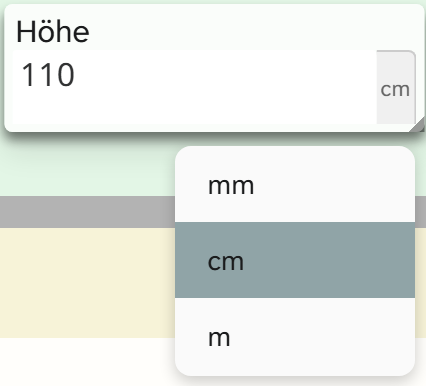
| Unit | factor | 120 stored shows |
|---|---|---|
| mm | 10 | 1 200 |
| cm | 1 | 120 |
| m | 0.01 | 1,2 |
Set the base unit once and do not change it again. Giving factor: 1 to a different unit later shifts the
meaning of every stored number. Which unit a single object has chosen is recorded in its modifier 1, not in
the value.
| Case | Configuration |
|---|---|
| Simple number field | none, the default mask applies |
| Fixed unit without a choice | a single unit in units, or only default_unit |
| Choice of units | several units in units, plus default_unit |
Under Parameters the form maintains units and default_unit together, so that no preselection can
arise that is missing from the list.
For amounts of money every currency gets factor: 1. Exchange rates fluctuate, and an amount stored after
conversion would be wrong later on.
The wall planner reads measurement fields through their unit and needs a resolvable millimetre factor for that. A measurement field without a recognisable unit is skipped there.
Input mask
The mask follows imask.js . Its keys sit flat in the configuration or grouped under imask. A partial entry such as {"scale": 2} is completed from the default.
| Key | Values | If omitted | Effect |
|---|---|---|---|
scale | Number | 2 (for int 0) | Decimal places shown. For int only 0 |
thousandsSeparator | one character | space | Thousands separator |
radix | one character | , | Decimal separator |
mapToRadix | List of characters | [".", ","] | Characters that count as the decimal separator when typing |
padFractionalZeros | true, false | false | Pads the decimal places up to scale (in the form only for decimal) |
normalizeZeros | true, false | true | Tidies up leading and surplus zeros |
signed | true, false | false | Negative numbers allowed |
min, max | Number | no limit | Input limits |
units | List of unit/factor | empty | Units, see above |
default_unit | unit/factor | base unit, otherwise the only unit | Preselected unit. The form under Parameters sets it itself if none is chosen |
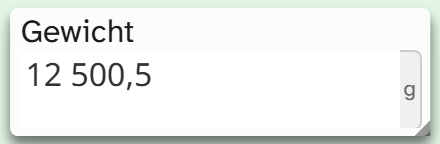
The field “Gewicht” (weight) in the demo collection combines units and mask:
JSON{
  "units": [
    { "unit": "g",  "factor": 1 },
    { "unit": "kg", "factor": 0.001 }
  ],
  "default_unit": { "unit": "g", "factor": 1 },
  "scale": 2,
  "radix": ",",
  "thousandsSeparator": " ",
  "padFractionalZeros": false
}
Further imask keys are passed through: blocks, definitions, lazy, placeholderChar, displayChar, eager, overwrite, skipInvalid, autofix, from, to, maxLength, enum.
scale affects only the display, but visibly so: with scale: 2 the mask cuts 12,34567 down to 12,34 as soon as it loads, and saving writes this shortened value back. For decimal, values are rounded beyond
the fifth decimal place.
Formatting
The field type comes with two formattings, neither of them preselected anywhere:
| Formatting | Output | Identifier |
|---|---|---|
| Number | The number with the field’s mask | standard |
| Number with unit | The same, plus the unit | einheit |
Since version 1.4.23 “Number” outputs only the mask. Before that, the only formatting was called “Number with unit”. Wherever it was chosen on a field with a unit, the unit has been missing since then until “Number with unit” is chosen. See Formatting .
When another field type fits
| Need | Field type |
|---|---|
| Whole numbers | int |
| Several dimensions in one field, such as height, width and depth for object and frame | JSON |
| Inventory numbers, shelf marks | Text |
| Classes such as under 50 and 50 to 100 | Virtual field on top of the number field |