
Field types
Number
A number field for dimensions, weights, amounts and quantities. There are two field types with the same input: the decimal number (up to five decimal places) and the integer.

Input
Type. The field formats as you type: thousands are separated and decimal places are limited. Both comma and point are accepted as the decimal separator. The value is saved when you leave the field.
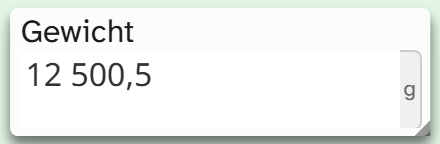
Still image: typing into a number field
If the field has several units, a selection appears next to it, for example mm, cm, m. The chosen unit applies to this object and stays set the next time you open it. If the field has exactly one unit, it is shown fixed next to the number.
An uncertain value such as ca. 120 cannot be saved. Enter the number instead and set “uncertain” in the field metadata, see Field metadata .
What is stored
The value is always stored in the base unit, regardless of the chosen unit. If the base unit is
centimetres, an entry of 1,2 m is stored as 120.
This keeps values comparable and sortable, even when each object displays a different unit. The thousands separator and the unit are display only; they are not part of the stored value.
| Action | Behaviour |
|---|---|
| Filter | Numeric comparisons: greater than, less than, greater than or equal, less than or equal. Give comparison values in the base unit |
| Sorting | Numeric |
| Grouping | On the stored value |
| Full-text search | Yes, on the stored value |
| Bulk edit | Add, subtract, multiply, divide, round, custom formula, replace, clear |
The import does not convert. A column in metres imported into a field with the base unit centimetres results in centimetre values that mean metres. Convert in the spreadsheet beforehand, or multiply after the import with bulk edit . See Excel import .
Display and export
| Formatting | Result for 1234.5, unit cm |
|---|---|
| Raw value | 1234.5 |
| Number | 1 234,50 |
| Number with unit | 1 234,50 cm |
“Number” outputs only the formatted number, “Number with unit” adds the unit. Since version 1.4.23 these are two separate formattings. If you had chosen the formatting on a field with a unit before, you now see the number without a unit and need to choose “Number with unit” again. You choose it in the view settings or in the Excel export .
In Word templates, imask() formats with the field’s mask. See Template functions .
Setup
Units, base unit and mask are set by the administration. See Configuring numbers .