
Field types
Date
A date, typed as year, month and day or chosen in the calendar. Partial dates are allowed, which makes the field type suitable for historical dates too.
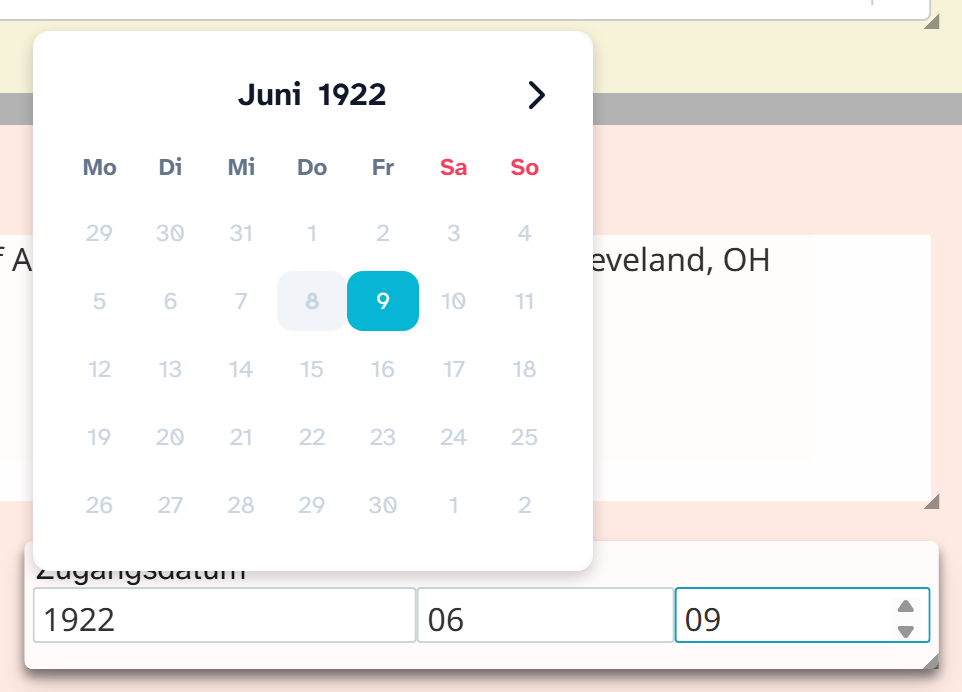
Input
The field has three inputs: year, month, day. You can type into them directly or use the calendar, which opens when you click into one of the inputs. The calendar works its way from the year through the month to the day.
Whatever is not known stays empty. If the administration has switched off month or day, for example for a field that only holds a year, those inputs are missing.
Incomplete dates
Missing parts are stored as 00. The value is always stored in the form YYYY-MM-DD:
| Input | Stored | Meaning |
|---|---|---|
| 5 March 2026 | 2026-03-05 | complete |
| March 2026 | 2026-03-00 | month and year known |
| 2026 | 2026-00-00 | only the year known |
| empty | 0000-00-00 | no date |
This means:
| Action | Behaviour |
|---|---|
| Sorting | Chronological. 1850-00-00 comes before 1850-06-15, that is at the start of the year |
| Filter | Comparisons on the form YYYY-MM-DD. Less than 1900-01-01 also finds 1850-00-00 |
| Grouping | Split by -: depth 1 gives years, depth 2 years and months. Values with 00 as the month form a group of their own |
| Calendar view | If the field is chosen as the calendar field in the view settings. See Calendar |
| Bulk edit | Set to a date, set to today, shift by days, months or years, replace, clear |
| Excel import | Date values are brought into the form YYYY-MM-DD |
Details such as um 1900 (around 1900), 2. Hälfte 19. Jh. (second half of the 19th century) or undatiert (undated) do not fit into a date field. The usual solution: a date field for the approximation, plus a text field for the wording. For the uncertainty itself there is “uncertain” in the field metadata . If the date belongs to a process such as an acquisition or a conservation treatment, an event is the better place.
Display and export
In gallery, table and object view, the date follows your setting, for example DD.MM.YYYY or D. Month YYYY. See View settings .
For the export there is the formatting Date DD.MM.YYYY. It leaves out missing parts: 2026-03-00 becomes 03.2026, 2026-00-00 becomes 2026. Without formatting the cell holds the raw value YYYY-MM-DD. See Excel export .
In Word templates, fdate() fixes the format in the command so that a document looks the same for
every user. See Template functions .
Setup
Which parts the field shows and in which language the calendar appears are set by the administration. See Configuring dates . For a point in time with a time of day there is Date and time .