
Field types
Image
One image on the object, with a preview in the tile. The classic case is the title image; further image fields hold, for example, the back or a detail.
Input
Drag a file onto the field. It is uploaded and assigned to this field straight away. The same works in the gallery when you drag a file onto the image area of a card. See Upload files .
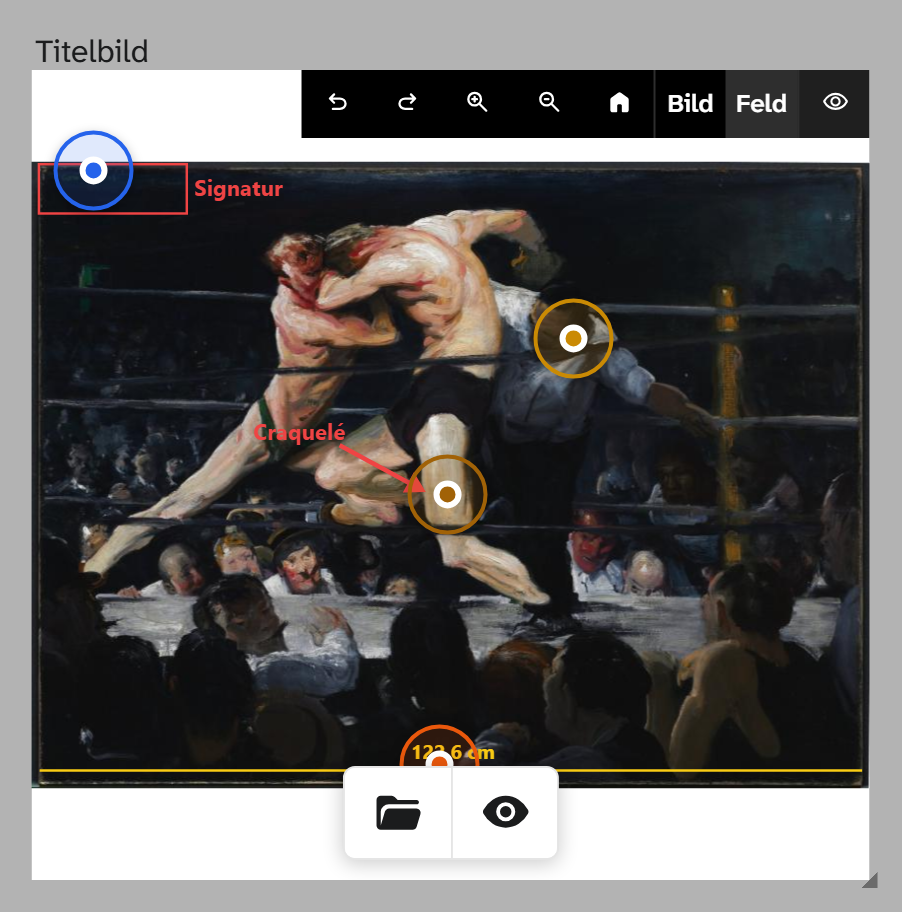
A click on the image opens the image viewer with the image studio : zoom, rotate, crop, markings, hotspots. These edits do not change the original file. Crop and cut-out belong to the field: the same image can appear cropped in one field and complete in another.
If you swap the file in the field for another one, the field asks whether the crop and cut-out should be carried over.
Any file for which a preview is created counts as an image, including TIFF, PDF, HEIC and camera raw files. See Supported formats .
What is stored
A reference to the file in the file library , not the file itself. Name, description, rights details and keywords are attached to the file and maintained there. The same file can be attached to several objects without being copied.
| Action | Behaviour |
|---|---|
| Filter | equals with an empty search term finds all objects without an image, the quickest way to a list of gaps. The file’s details (name, creator, keywords) can be filtered as subfields |
| Sorting | Not useful |
| Gallery | In the view settings, image fields determine the card images |
| Bulk edit | Replace file, clear; transfer crop and markings via the modifiers |
For any number of images on an object there are file areas, see File library .
Display and export
| Formatting | Preset in | Result |
|---|---|---|
| Raw value | Export | Identifier and details of the file |
| File title | Gallery, table, kanban | The file’s text, otherwise the description, otherwise identifier and extension |
In the Excel export the image is embedded; size and edits can be chosen per column. See Excel export . For Word templates see Template functions .
Setup
The field type has no parameters. See Configuring images .