
Libraries
Events
An event is an entry in the object’s history, such as an exhibition, loan, acquisition, production, conservation, change of location or valuation. It is linked to objects and is not a field value. A loan is such an event, with all its objects attached to it. The model is explained under Events as shared data .
Event types
Managed under Libraries › Events, section Event kinds (status 9). A type determines which events exist and what their input looks like.
| Property | Meaning |
|---|---|
| Key | Technical identifier, such as ausstellung. Stays fixed. The mappings of the metadata standards and Word templates point to it |
| Label | What appears in the interface |
| Shared (picker) | yes: the event is searched for and selected. no: object-private, it is created on the object |
| Max per object | How many events of this type an object may have |
| Access | Base access to this type, plus access per group |
| LIDO terminology URI | Link to the type of event in the LIDO terminology. This is how the export names it correctly |
| Colour | Identifying colour in the interface |
| Slot configuration | Which inputs the type shows, see below |
Group grants need a type that has already been created. Save first, then set the access.
Shared or object-private
| Shared | Object-private | |
|---|---|---|
| Creating | Once, then search and select | On the object |
| Appears in the selection menu | yes | no |
| Typical types | Exhibition, loan, campaign, publication | Production, acquisition, condition check, conservation |
| A change affects | all linked objects | only this object |
Slot configuration
Determines which inputs a type offers:
| Slot | Input |
|---|---|
| Authority data (GND/Wikidata) | Participants as an authority record |
| Address book | Participants from the address book |
| Free text | Participants as free text |
| Range (from/to) | Two dates |
| Display text | Free-text dating such as around 1900 |
A production type needs authority data and a range; a loan type the address book and a range; a condition check type the address book, a range and a description.
The configuration is JSON; invalid JSON is rejected (Slot configuration is not valid JSON).
Details of an event
| Field | Note |
|---|---|
| Title | Name of the event |
| Who | Participants, see below |
| Place | As free text or from the authority data |
| When | From, To. Format JJJJ-MM-TT (year, month, day), with 00 for unknown parts |
| Date (display) | Free-text dating |
| Description | Free text |
Several participants
An event can have several participants, each with their own Role, in a fixed order. This lets you record made by A, designed by B, executed by C correctly instead of in a free text field.
Each participant is an authority record, an address book entry or free text, depending on which slots the type offers.
LIDO enrichment
An additional section with details that LIDO knows and that exports need:
| Field | Corresponds to |
|---|---|
| Culture | culture |
| Period / era | periodName |
| Method | method |
| Materials / technique | materialsTech |
| Attribution qualifier | attributionQualifier |
This makes the mapping to the LIDO facets direct. See LIDO .
In the events area
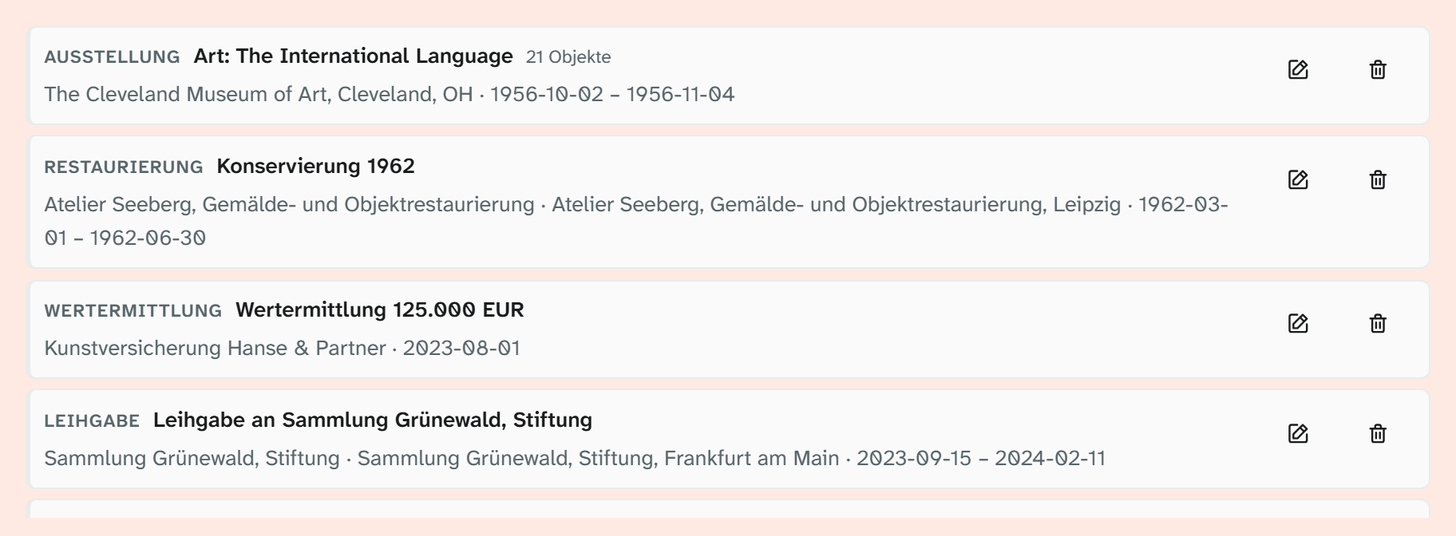
The events area in the object view lists the object’s events as cards, with the Add event button at the top. Each card shows the type as a badge, the title and, for a shared event, the number of objects (n objects), and below them participants, place and period. On the right there are two icons: Edit opens the event with its object link in a dialog, Remove detaches the link to the object. A card cannot be expanded. The icons only appear with write access to the type.
Object link
These details apply only to this object in this event:
| Field | Note |
|---|---|
| Role/catalogue number | The role of this object, or its number in the catalogue |
| From, To | A different period just for this object, such as a shorter loan period |
| Source | Where the information comes from |
| Note | Free text |
| Uncertain | Marking |
| This project only | Restricts the link to one project. Global is the default |
| Order | Events on the object can be ordered by dragging |
This is the difference from the other libraries: an event link carries data of its own.
Create from project
Creates a shared event for a project and links all its objects (Create & link). Without a title of its own, the project name is used.
Run again, the action only links the new additions. This lets you update an exhibition several times during its preparation without creating duplicates.
Access
| Action | Permission |
|---|---|
| See events of a type | Read access to the type |
| Create and link events of a type | Write access to the type |
| Manage event types | Status 9 |
Access follows the same model as for fields: base access on the type plus group access, which adds upwards. See Permission model .
Where events appear
| Place | Behaviour |
|---|---|
| Events area in a layout (input form) | Optionally restricted to particular types |
| Full-text search | With the Events search scope |
| Excel export | On a sheet of its own, with the option Events (separate sheet) |
| Word templates | See Template variables |
| Metadata standards | Events go into the export with the LIDO identifier of their type, see Metadata standards |
| History | Created, linked, link changed or removed, order changed, deleted |
Further reading
- Events as shared data : why it is built this way
- Manage events : the procedure
- LIDO : the facets of
event