
Libraries
Literature
In Moliri, literature lives in a project of its own, the literature project. Each title there is a record, a literature record. The objects of the collection refer to it, for example “dokumentiert in” (documented in) with page and catalogue number, and Moliri outputs these references as citations.
The literature project
A literature project is created when an administrator installs the Literatur (literature) process template (under Data model › Metadata standards). It creates the project with the object type Literatur, plus the fields and the link types. Only in a project of this object type is there a New from reference button and a Citation list view.
The fields follow the details a citation style needs:
| Area | Fields |
|---|---|
| Reference | Publication type, title, short title, statement of responsibility, contained in |
| Publication | Series, series no., volume, issue, edition, pages, extent, publisher, place of publication, year of publication |
| Identifiers | ISBN, ISSN, DOI, URL, access date, identity |
| Content | Language, abstract, note |
| Archive | Archive, location in the archive, shelfmark |
Authors, editors, translators and contributors are not text fields. They are links to people in the authority data , with the form of the name as printed stored as a detail on the link.
Literature records have no inventory number. Links to literature therefore show the record’s title, also in the usage list of the libraries.
New from reference
Instead of typing a title, you search for it in a source and take over the reference. The button with the book icon, tooltip New from reference, is in the bottom bar of the literature project next to Create new object. It needs the same permissions as creating an object and, in addition, write access to the Identität (identity) field. Without it, the dialog says No write access to the identity field and creates nothing.
| Source | Finds |
|---|---|
| Deutsche Nationalbibliothek | Books and media from the German-speaking countries, by ISBN or title |
| K10plus | Holdings of the GBV and SWB library networks |
| Crossref | Articles and books with a DOI |
| Wikidata | Works with an entry in Wikidata, prefiltered to literature |
You search by ISBN, DOI or title in the same search window as for authority data . On the left are the literature records that are already in the collection, on the right the hits from the sources. For an ISBN or DOI the window shows only exact hits.
After you choose a hit, the dialog shows a preview: the reference, each field with the value it will get, and the people who will be linked, with their role (Author, Editor, Translator, Contributor). Back returns to the search, and the hits stay. Create creates the literature record and opens it. A message gives the number of fields inherited and people linked.
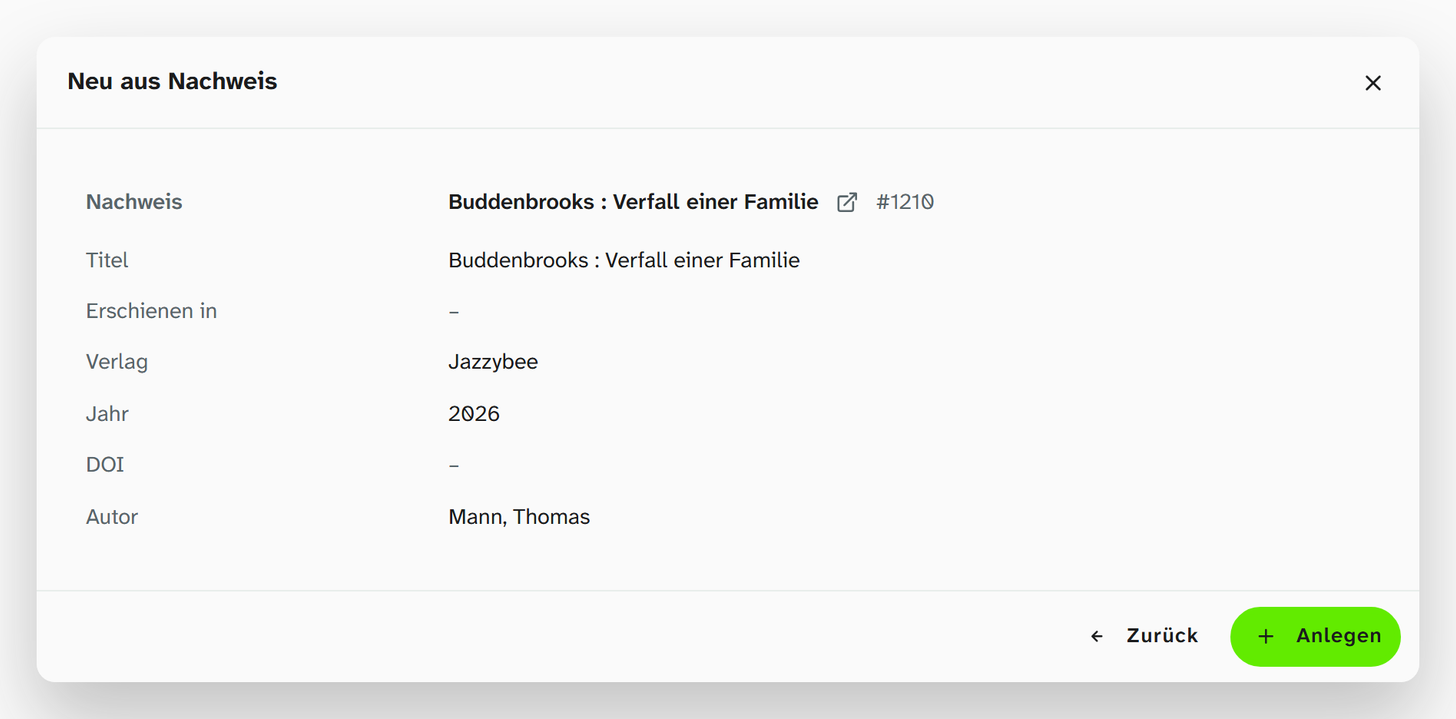
What the reference fills
The fields inherit from the Identität field, the authority record of the reference: title, publisher, year, identifiers and so on. The dialog writes only the identity; the server fills the other fields and the people from it. If a later authority data sync changes the reference, the fields follow as long as nobody has changed them by hand.
The statement of responsibility also comes from the reference. For the Deutsche Nationalbibliothek and K10plus it is the statement as it appears on the title page. For Crossref and Wikidata Moliri puts it together from the authors’ names, for example LeCun, Yann; Bengio, Yoshua; Hinton, Geoffrey. References fetched before this inheritance source existed get the statement at the next authority data sync.
Authors via the GND
Moliri links the people through the Gemeinsame Normdatei (GND). If the GND identifier is in the library’s record, it is used. Otherwise Moliri asks the GND for the name and links only if there is exactly one hit. A common name therefore stays unlinked. This is deliberate: a wrong author is worse than none. The message after creating names such cases (Names without a GND match, not linked), and the name remains in the statement of responsibility.
If the GND cannot be reached, existing links stay as they are. Moliri looks up many names at once in the background (names are being looked up in the background).
Duplicates
If an object in the project already has the same reference, the dialog shows a notice with a warning sign above the preview: Already in the project and the number of hits. This means the same record at the source, not a title that reads the same.
| Button | Effect |
|---|---|
| Open ⟨inventory number⟩ | Main button. Closes the dialog and opens the existing record (the first hit) |
| Links after More: | Open the other hits, if there are several |
| Create anyway | Creates a second record with one click. Moliri warns but does not block |
Some duplicates are only recognised by the server, for example through a cross-reference between Wikidata and the GND. The dialog then switches to the same state after Create, without having created anything yet. Without a hit, Create remains the main button.
Literature on the object
An object refers to literature through a link or through a field of the Object field type that points to the literature project. The process template brings these link types:
| Link type | Details on the link |
|---|---|
| dokumentiert in (documented in) | Page, catalogue no., fig. no. |
| abgebildet in (illustrated in) | Page, fig. no., in colour |
| reproduziert in (reproduced in) | Page, fig. no. |
| Erstbeschreibung in (first described in) | Page |
| enthalten in (contained in: literature in literature, such as an essay in an edited volume) | Pages |
The details on the link are the exact location. The citation appends them, for example S. 12 (p. 12) or Kat.-Nr. 47 (cat. no. 47). They are stored on the link, not on the literature record, because the same catalogue shows each object on a different page.
An object field can also find and create literature directly: its selection dialog then has New from reference as well. See Object .
Citations
A citation comes in two forms:
| Form | Example in the default style |
|---|---|
| Short citation | (Meier 2001, S. 12) |
| Full citation | MEIER, Anna, 2001. Die Kunst der Gotik. Berlin: Deutscher Kunstverlag. Studien zur Kunstgeschichte, 12 |
Both forms are available in these places:
| Place | Where you choose the form |
|---|---|
| Gallery, table, kanban | Formatting of the object field; for link columns such as dokumentiert in, the column’s mode |
| Excel export | Formatting of the column, see Excel export |
| Word report | Formatting of the placeholder in the template, see Word reports |
| Citation list | Always full citation |
As the author, the citation names the linked people. If no person is linked, for example because the GND had no unambiguous hit, it uses the statement of responsibility.
Citation list
The Citation list view exists only in the literature project. It is in the view menu at the top right, next to gallery and table; the project remembers your choice.
The list shows the literature records that the gallery and table would show too: filters, search and Wahl apply. Each entry is a full citation and leads to the record with a click. The order, and how authors with the same name in the same year are distinguished (2001a, 2001b), are determined by the citation style.
| Button in the bar | Effect |
|---|---|
| Quotation icon (citation style) | Choose the style and language for this list |
| Reload | Reads the entries again |
| Word icon (Export as Word bibliography) | Downloads ⟨project name⟩ - Bibliography.docx with the heading Bibliography and hanging indent |
Citation style
Moliri cites according to the Citation Style Language (CSL). You can choose from the whole style directory of citationstyles.org with more than 10,000 styles, from APA and Chicago to the house styles of individual journals, and any language for which there is a CSL locale file.
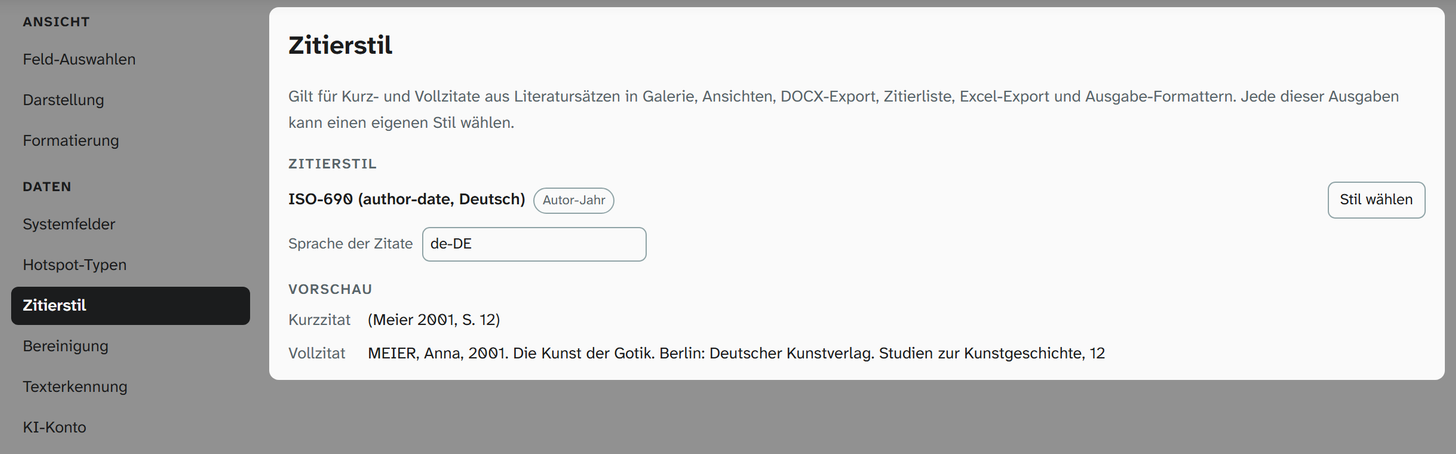
The instance has one style, which administrators set under System › Settings › Citation style (status 9). The default is ISO-690 (author-date, Deutsch) according to DIN ISO 690:2013-10, in German. The page shows the short and full citation of a sample record in the chosen style.
Each output can choose a style of its own. The first one that is set applies:
| Rank | Where | Applies to |
|---|---|---|
| 1 | The output itself: view settings , citation list, Excel export, Word export | This view, this list, this export |
| 2 | The object field (option Citation style, set by administrators) | Short and full citation of this field |
| 3 | The instance | Everything that chooses nothing else |
The citation list skips rank 2: it follows its own choice or the instance’s style.
The style picker is the same everywhere. Choose style opens the search (Search styles, e.g. APA, Chicago, ISO 690, journal titles …). The chosen style shows its type: Author-date, Numeric, Note, Label or Author. Language of the citations switches, for example, between “S.” and “p.“; As the style says uses the language the style itself names. Use default clears the output’s own choice.
When the citation service cannot be reached
The styles are computed by a service of the instance. If it cannot be reached, the citations show only the title with the exact location for the time being. The interface reports this once per style (Citation style “…” cannot be loaded right now), the Excel export with a note in the dialog. The data itself is not affected.
Setup
Administrators install the process template under Metadata standards . The installation sets the title field Titel on the link types that point to literature, but only where none is set yet; the installer’s preview shows this as a row of its own. Where literature was already installed, installing it again catches this up.
A field that already exists keeps its configuration during the installation. If an existing statement of
responsibility does not yet inherit from the reference, the preview lists it under Existing, do not inherit from the identity. The inheritance source Identität~raw.statement-of-responsibility can then be set in the field settings.