
Views
Set up the calendar
The calendar shows the object selection by its date fields: when which loan arrives, when it goes back, when a transport is due.
-
Open the view settings (cog on the right of the header), area Calendar fields, and choose the date fields, for example Leihbeginn (loan start) and Leihende (loan end). Without a choice, the calendar takes the first date field. Fields with date and time count as date fields too.
-
Open the Calendar tab.
-
Choose the display:
Button Shows Day Month sheets with one box per day. Periods run across the weeks as bars Month Twelve month tiles per year with the entries of each month Year One tile per year with the entries of that year Agenda The dates as a list Timeline The dates on a time axis, one row per field -
In the legend, show or hide each field with Show on calendar or Hide from calendar. Each field has a colour of its own.
Single date or period
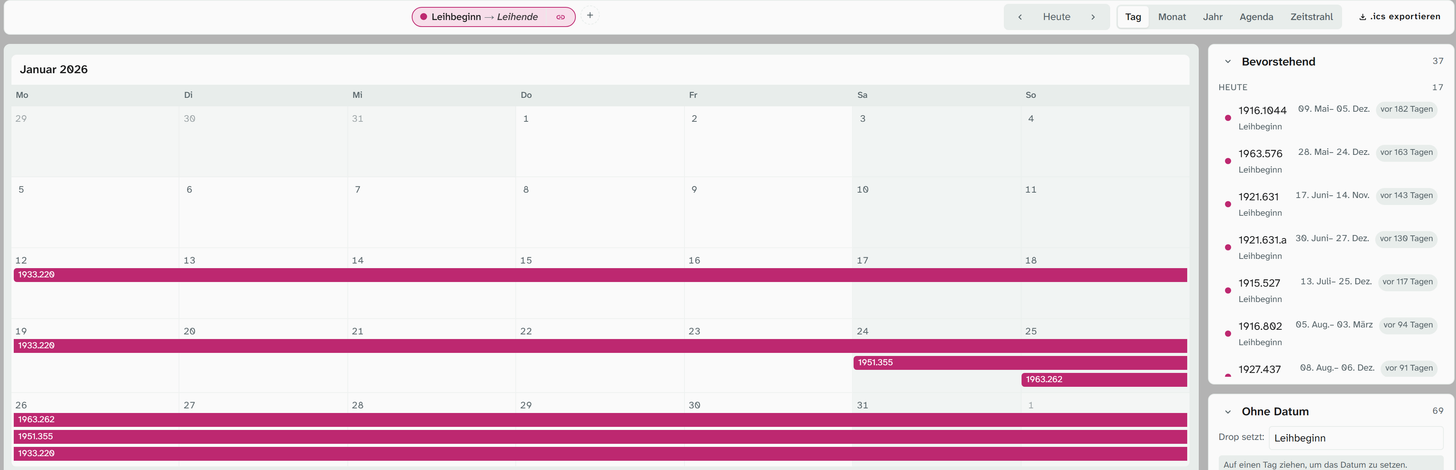
Each date field first appears as a single date. For a loan period you connect two fields: in the legend, click Pair with… next to Leihbeginn and choose Leihende. The legend then shows Paired with Leihende as a hint on the link icon and the label Leihbeginn → Leihende, and each object appears as a bar from the earlier to the later date, no matter which field you chose first.
The browser remembers this pairing per project. On another computer you have to set it again.
Set dates by dragging
You can drag entries in the calendar to another date. For a period, start and end move by the same amount.
Objects that do not have the date yet are listed in the Without date area. Choose a field there, and then: Drag onto a day to set the date. In the Month display, dropping onto a month tile sets a date without a day; in the Year display, a date with the year only.
Dragging requires write access to the field. Without it, the area shows No write access to this field.
Incomplete dates
| Stored | Appears |
|---|---|
2026-03-05 | on 5 March 2026, in all displays |
2026-03-00 | only in the Month display (in March) and the Year display (in 2026) |
2026-00-00 | only in the Year display, in 2026 |
0000-00-00 | never |
A field with date and time appears on the day of its date.
Export as an ICS file
Export .ics downloads the project’s calendar as a file that you can import into Outlook or another calendar. That way the building services team also has the deliveries in their own calendar. Like the calendar itself, the file contains the object selection of the open project.
The most useful arrangement
Calendar in the sidebar, object in the workspace. Go through the dates and catalogue as you go, without switching views.