
Objects
Edit objects in bulk
The same change on all objects in the current selection, for example moving the loan start of all loans in an exhibition by one week, or correcting a loan list in one go.
-
Narrow down the selection. The batch covers exactly the objects the view has loaded. Filters, full-text search and the Wahl filter are the tools for this. The number in the footer is the number of objects affected. Reading it is the first safety step.
-
In the workspace, open the Batch tab. It contains the Batch editor.
-
Add card. Choose a field, then the channel: Value, Colour, Source or Comment.
-
Choose the kind of change. You are offered what suits the field: text tools, arithmetic, date tools or toggles. Each kind comes with a sentence explaining it. For the Colour channel there are only Replace and Clear.
-
Check the preview. For each object, the old and new value, with the differences highlighted. You can deselect individual objects. Hide unchanged shows only what will actually be written.
-
Apply. Per card with Apply changes in this field, or all together with Apply all changes for all fields.
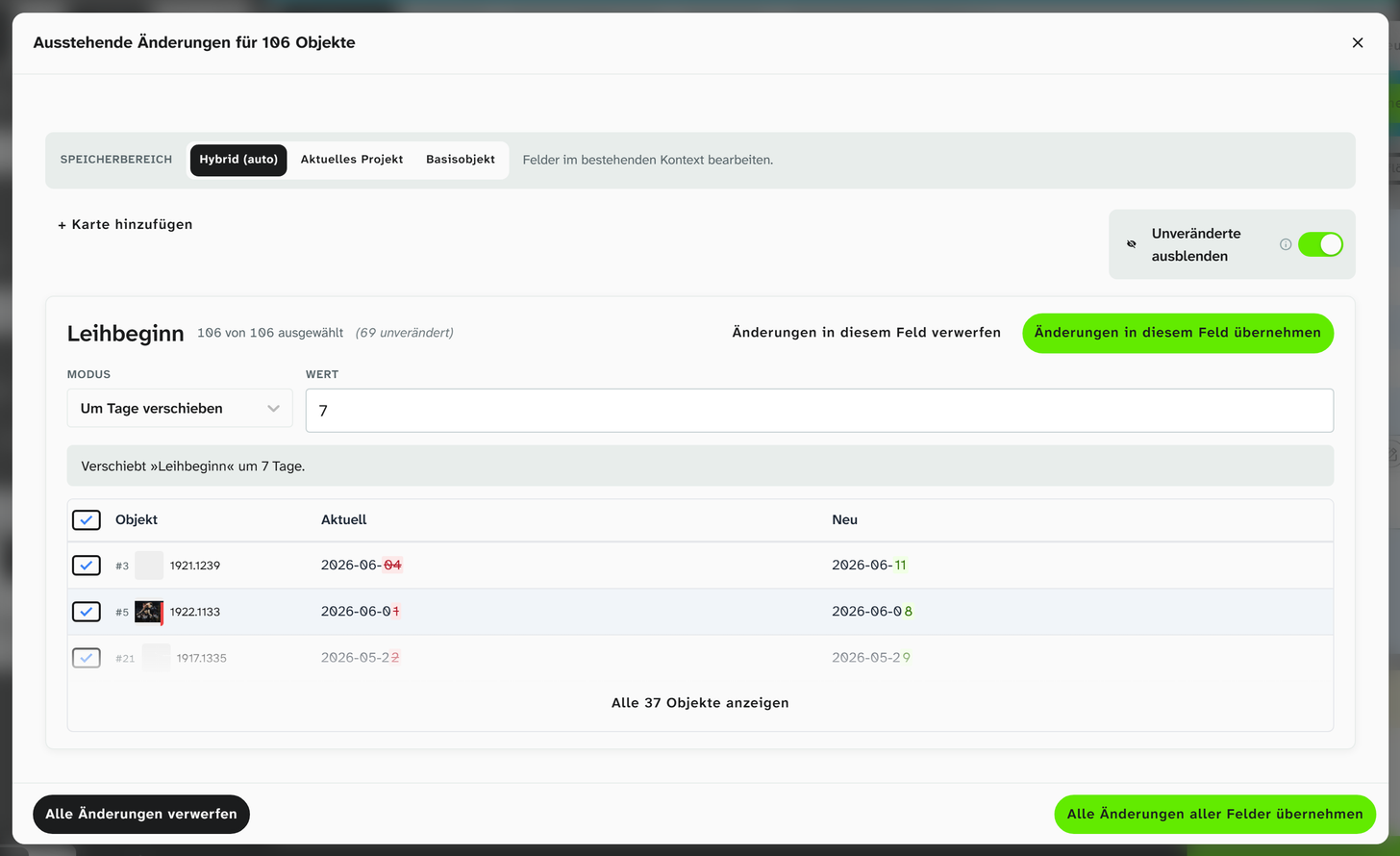
Still: card for Leihbeginn in the mode Shift by days with 7 days, preview of old and new, at the top the button Apply changes in this field.
The kinds of change
| Field type | Kinds of change |
|---|---|
| Text and selection | Replace, From fields, Prepend, Append, Search & Replace (scope First, All or Last), Preg Replace, Clear, UPPERCASE, lowercase, Title Case, Trim whitespace, Collapse whitespace |
| Number | Add, Subtract, Multiply, Divide, Round, Formula |
| Date | Shift by days, Shift by months, Shift by years, Set to today, Set to date |
| Toggle | Toggle, Set to true, Set to false |
Which kind is offered for which field type is listed in full in the bulk edit reference .
Mind the save scope
If the objects are in several projects, one Save scope applies to the whole run:
| Scope | When |
|---|---|
| Hybrid (auto) | The normal case. Fields with a project-specific value write that value, all others write the shared value |
| Current Project | When the change should affect only this project, such as the catalogue numbers of an exhibition |
| Base Object | When you explicitly want to change the shared value |
See Project-specific values .
Common tasks
| Task | How |
|---|---|
| Give all loans the same loan status | Replace, for example with Entliehen |
| Put an abbreviation in front of every loan contract number | Prepend |
| Correct a wrong spelling | Search & Replace, scope All |
| Convert dimensions from metres to centimetres | Multiply by 100 |
| Move the loan start by one week | Shift by days, value 7 |
| Increase insurance values by a surcharge | Formula, for example x * 1.1 |
| Remove a colour marking | Channel Colour, Clear |
| Standardise year ranges | Preg Replace with a pattern for four digits, hyphen, four digits |
Moving objects to the trash is quicker through the object menu, see Delete an object .
If something goes wrong
A batch run can be undone as a whole: in the sidebar, open the Editing History tab, view Batch operations, and click Undo Batch next to the run.
The dialog marks conflicts: fields that have been edited again since. The usual approach: select the entries without a conflict and undo them, then look at the conflicts individually.
See Trace changes .
Further reading
- Bulk edit : all kinds of change for each field type
- Regular expressions : for Preg Replace
- Filter objects : narrow down the selection