
Objects
Delete an object
Moliri has three different actions that could all be called deleting. If you can tell them apart, you will get a fright less often.
| Action | Effect | Reversible |
|---|---|---|
| Move to the trash | The Wahl is set to Trash. Taken out of the selection, values remain | yes, completely |
| Remove the link | Removed from this project. Values remain and are still visible in other projects | yes, completely |
| Delete for good | Only by support | no |
Move to the trash
-
Open the object menu (☰) on the object preview.
-
Choose Delete object and confirm the prompt Move object to the trash? with Delete.
The entry only appears if you have write access to the field Wahl. Where the field Wahl is in the layout, you can also set it to Trash there.
For many objects at once: bulk edit with the field Wahl and Replace.
An object can be in the trash in one project and active in another. If you move a withdrawn loan to the trash in the exhibition, you do not take it out of the loan request.
Restore
-
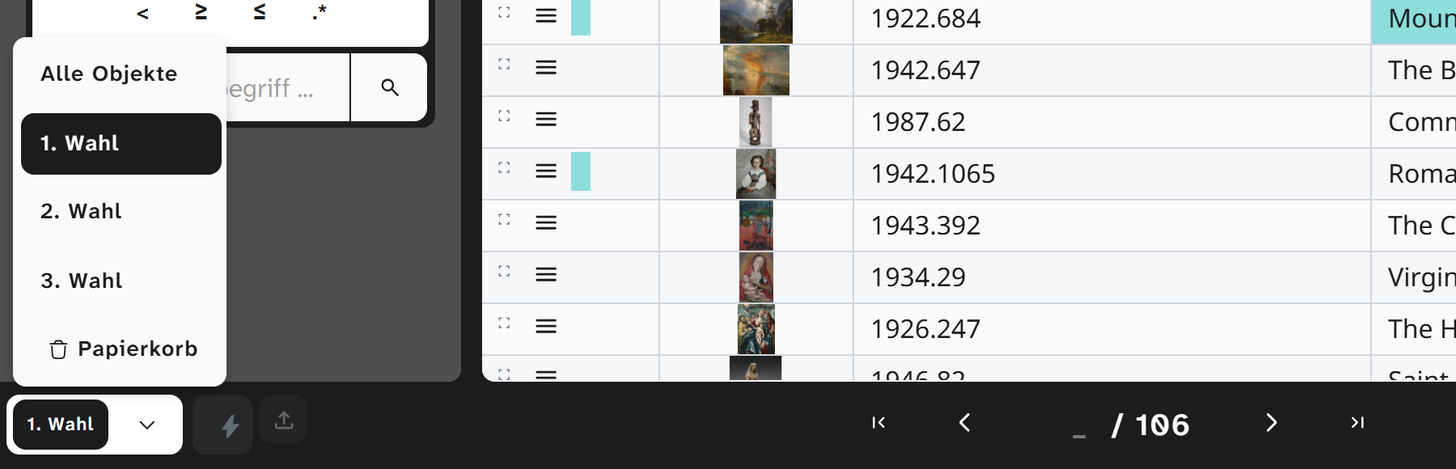
At the bottom left of the project page’s footer, set the Wahl filter to Trash. The options are All objects, 1st choice, 2nd choice, 3rd choice and Trash.
-
Open the object menu (☰) on the object and choose Restore object, or set the Wahl to 1st choice.
If the field Wahl has been hidden in setup, the footer shows the toggle Show trash instead (and Leave trash to go back).
Remove a link
If the object does not belong in this project but does belong in another: Assign projects and deselect the project. The values remain; when you link the object again, they are back.
The last link cannot be removed. An object must be in at least one project.
What is right when
| Case | Action |
|---|---|
| Object created by mistake | Trash |
| Loan was cancelled, the request should remain on record | Trash in the exhibition, adjust the loan status in the request |
| Object does not belong in this exhibition but does belong in the holdings | Remove the link |
| Duplicate record | Transfer the values to one, move the other to the trash |
| Legal obligation to delete | Support |
Further reading
- Sidebar : Wahl filter and tabs
- System fields : why deleting means writing the Wahl
- Link an object to projects