
Data model
System fields
Two fields have a fixed meaning for Moliri. They look like ordinary fields but behave
differently, and their technical name is fixed: object_id and selection. That is what they are called
in Word templates, formulas and imports; the interface shows them as Object ID and Wahl.
Object ID
The identifier of the object. It cannot be edited, is always present and is available in every view and every export.
In Word templates you reach it as $o.object_id, which makes it the basis for links back into
the application.
Wahl
The field whose value has a meaning in the program:
| Value | Meaning |
|---|---|
1 | First choice. Default for new objects |
2 | Second choice |
3 | Third choice |
9 | Trash |
Deleting is a write to Wahl. Putting an object in the trash sets Wahl to 9. This can be reversed and loses no data. It also explains why objects in the trash can turn up in the file export and in bulk edit when they are pinned.
Wahl applies per project. When an object is linked to a further project, it gets its own Wahl there. The same object can therefore be active in one project and in the trash in another.
Settings › System fields
Under System › Settings, section Data › System fields, there are settings for the whole instance.
| Setting | Effect |
|---|---|
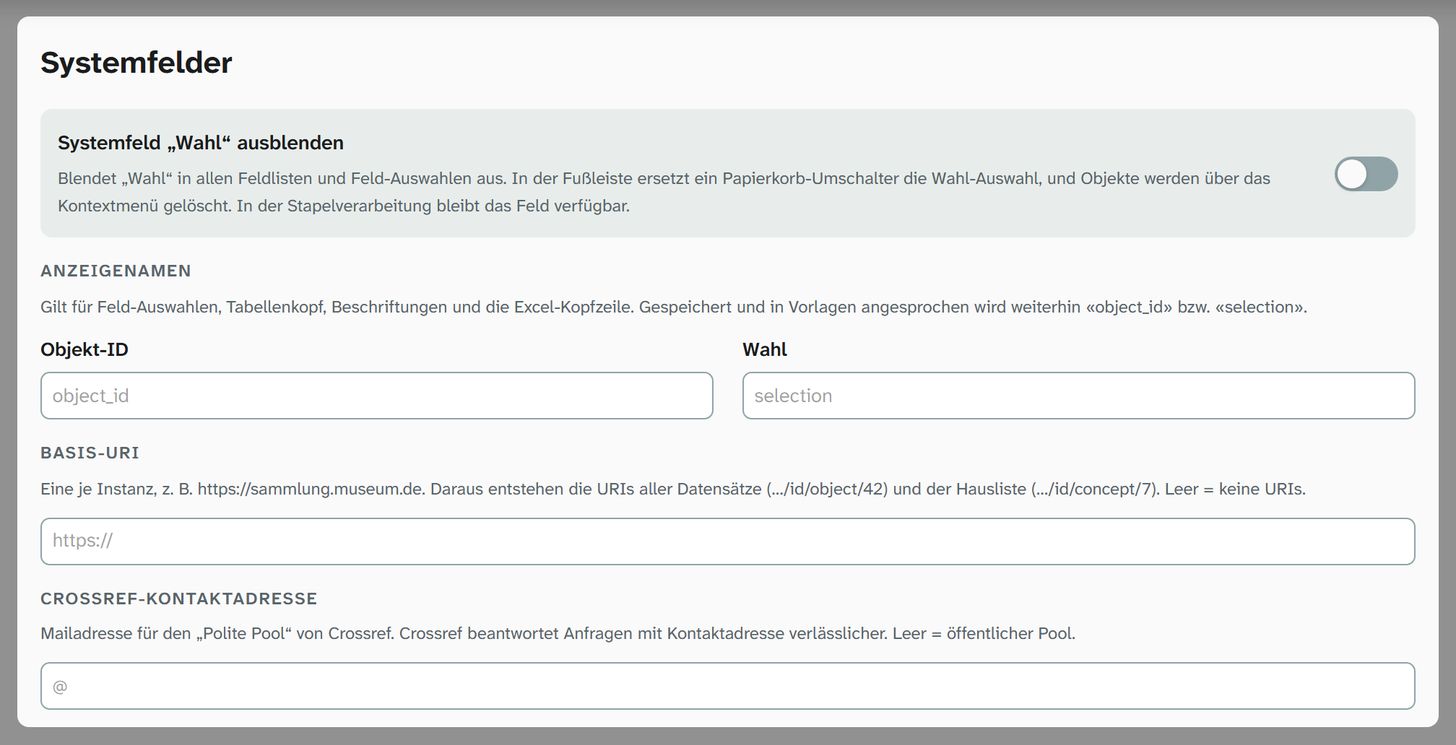
| Display names for Object ID and Wahl | A name of your own for field pickers, table headers, labels and the Excel header row. Searching also finds this name. Empty means the technical name (object_id or selection) |
| Hide the “Wahl” system field | Removes Wahl from all field lists and field pickers. In the footer a trash toggle replaces the Wahl selector, and you delete through the context menu |
| Base URI | The address from which the permanent addresses of all records are formed. It is also the switch for Linked Data, see below |
| Crossref contact address | Email address that Moliri sends along with requests to Crossref. Empty means the public pool |
Institutions that keep their own “ObjektID” use the display name to avoid two identifiers with the same name
side by side. In Word templates and in storage the names remain object_id and selection.
Even with Wahl hidden, the field stays available in bulk edit. Otherwise you could not put many objects in the trash at once.
Base URI
One base URI per instance, for example https://sammlung.museum.de. It is used to form the permanent addresses of
the records (…/id/object/42) and of the concepts in the in-house list (…/id/concept/7). Only
http and https addresses are accepted.
The base URI is the only switch for Linked Data and IIIF; there is no separate setting:
| Base URI | Linked Data and IIIF |
|---|---|
| empty | Off. Moliri publishes nothing, and all addresses under /id/, /ld/ and /iiif/ answer with “not found”, even for objects shared publicly |
| set | On. Objects shared publicly are published, see Shares |
When the base URI is set for the first time, Moliri saves it without asking. The next run then builds all public documents in full, including changes from the time without a base URI. When the runs take place is described under Operation .
Changing or clearing a base URI that is already set asks for confirmation first:
| Action | Consequence |
|---|---|
| Change | All of your own URIs (…/id/…, …/def/…) change. Existing links and citations to the old URIs lead nowhere; there is no redirect |
| Clear | Linked Data is off. The published documents are deleted at the next run, and the URIs then answer with 404 |
Cancel restores the previous base URI. Because addresses are cited and stored by aggregators, the base URI belongs on a domain that your institution will keep for good.
What system fields are not
All other fields (title, inventory number, title image, dimensions, location) are ordinary fields that the instance has created. Moliri assigns them no meaning. They only gain meaning for a standard through a mapping to a concept .
This also applies to the Titelbild (title image): it is an ordinary image field and is called Titelbild everywhere, including in Word templates. The gallery and the preview show it as the preset image until
other image fields are chosen in the view settings. If the instance has renamed or removed it, the image
column stays empty.
Likewise, the RegNr is an ordinary number field and is called RegNr everywhere, including in Word
templates, formulas and imports. The instance can rename it like any other field. Moliri treats it as the short identifier of the object: linked objects, select lists and notices show an object as
“project RegNr”, and the object search in links and in value matching finds it by its RegNr. The gallery
shows it as the preset text until another field is chosen in the view settings. If the instance has removed
the field, “project #ID” appears there instead.
The number is assigned by three event rules . When an object in a collection is created, it gets a number that is unique across all projects and the next number of its project. When it is linked to a further project, it gets a RegNr of its own there, the next number in that project. Objects in libraries have no RegNr.