
Data model
Event rules
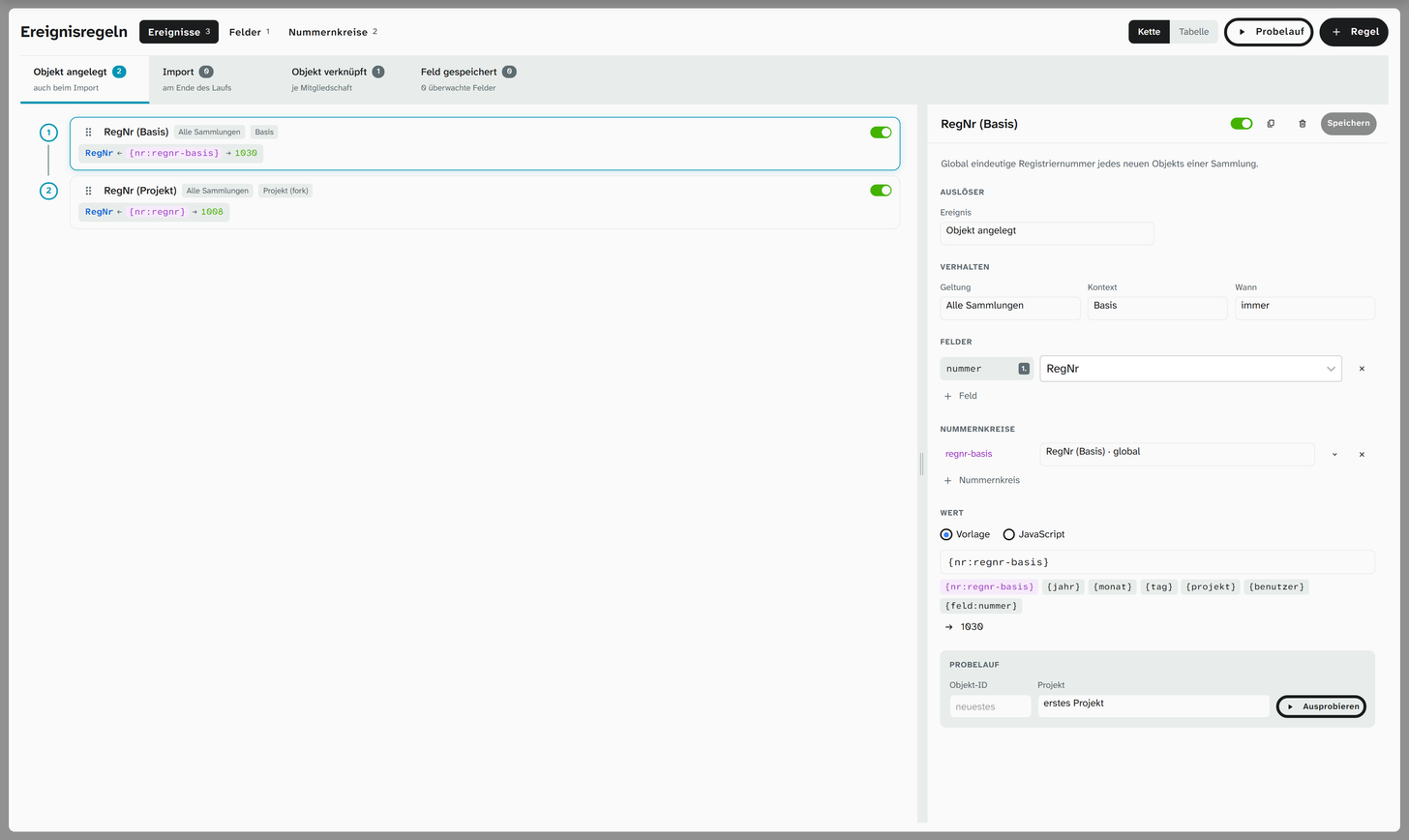
An event rule fills fields when something happens to an object: a running number on creation, the date of cataloguing, the name of the person who created the object, or a value that follows from other fields. The rules are under Data model › Event rules (status 9), the number ranges they count from under Data model › Number ranges. The page has three tabs: Events, Fields and Number ranges.
Triggers
| Trigger | When the rule runs |
|---|---|
| Object created | When an object is created or copied, also in the Excel import; once per project the object goes into |
| Import | At the end of an Excel import, for all objects of the run |
| Object linked | When an object is added to a further project, once per membership |
| Field saved | When the watched field is saved, by hand, by another rule or through inheritance |
Under Field saved the watched fields have a selection of their own. For the Excel import you choose per rule: trigger collects the triggers per object and field and runs them once at the end of the run on the final value; silent leaves the rule out during the import.
Order, chain and table
On the left are the rules of the chosen trigger in the order in which they run. You change the order by dragging. Each card shows the target field, the template and a sample value; the switch on the card turns the rule off without deleting it. The Table switch shows the same rules as a table. You can move the divider between list and details.
With Field saved, one rule can trigger the next. If you choose a watched field, the Follow-on chain shows which rules run one after another. There is no depth limit: the chain ends when a field would be written a second time. That point is marked in red. The check also catches two rules that rightfully write the same field; the message when saving an object then names the field and both rules.
Creating a rule
Rule first asks what the rule is for and fills in the form to match:
| Purpose | Prefilled |
|---|---|
| Running number | Trigger Object created, template {nr:nummer}, a number range with the key nummer |
| Timestamp | Template {jahr}-{monat}-{tag} |
| Recorded by | Template {benutzer} |
| Field from other fields | Trigger Field saved, a JavaScript function with target and source field |
| Empty rule | nothing |
Properties
| Property | Meaning |
|---|---|
| Name, Description | What the rule is called in the list and in the history |
| Event, Watched field | The trigger; with Field saved the field the rule waits for |
| Scope | Global, All collections, All libraries or one project. A project rule runs only there, a rule for all collections only in collection projects |
| Context | Automatic writes where the field has its value in the project; Base writes the value shared by all projects; Project (fork) a value of the project’s own |
| When | only if empty writes only into an empty field (an inherited value counts as filled); always overwrites |
| Fields | Key and field. The first field is the target of the template, the others can be read in the template. Authority data fields are excluded |
| Number ranges | The ranges the rule draws from, with their key. Expanded, each range shows its settings and counters; New number range … creates one |
| Value | Template or JavaScript |
If a rule writes into an inherited field, this counts as a change by hand: the value then stays, even if the source changes. In the history the name of the rule appears next to the person.
Template
The template line puts the value together from fixed text and placeholders. You can click the placeholders below the line; the preview calculates with the next number and today’s date.
| Placeholder | Returns |
|---|---|
{nr:schluessel} | The number from the range with this key, formatted as set on the range |
{jahr}, {monat}, {tag} | Year, month and day of the date on which the event happens |
{projekt}, {benutzer} | Name of the project and of the person who triggers the event |
{feld:schluessel} | The content of an assigned field |
So ADK-{jahr}-{nr:inventar} becomes ADK-2026-0042. Templates have no conditions; if you need one,
switch to JavaScript. Templates run without the media service; creating an object never depends on
it.
JavaScript
The function receives the values of the event and returns what is to be written. The same subset of JavaScript is allowed as for virtual fields ; the editor reports straight away what is not allowed. Copy prompt for an AI puts together a ready-made request for a language model.
| Name | Content |
|---|---|
objekt | The rule’s fields, by key: objekt['titel'] |
nr, nrRoh | The numbers drawn, by range key, formatted ('0042') or as a number (42) |
jetzt | Time of the event as text |
benutzer, projekt | Who triggers the event, in which project the rule runs |
ausloeser | object_created, import, object_linked or field_saved |
herkunft | With Field saved: who wrote the field, user, rule or inherit |
istNeu | True if the object came into being in this event |
leer | leer(v) is true for a missing or empty value |
JS// short form: the value goes into the first field
return `Z-${jetzt.slice(0, 4)}-${nr['depot']}`;
JS// several fields; null means: do nothing
const s = objekt['standort'];
if (leer(s)) return null;
return { fields: { kuerzel: String(s).slice(0, 3).toUpperCase() } };
0 is written, null, '' and false are not. JavaScript rules are evaluated by the media service; if
it does not answer, the field stays empty and the object is created all the same.
Dry run
Dry run in the head of the page or Try it at the bottom of the rule evaluates the rule as it currently stands in the form, even unsaved. If you give no object, it takes the newest object of the project. The table shows, for each field, the current value, the rule’s value and whether the rule would write (would write, already filled, no value). The dry run writes nothing and uses up no number.
Fields
The Fields tab shows, for each field, what writes into it: the rules with trigger and template, and inheritance from authority data , for example “inherits from Urheber (Normdatensatz)~label” or “inherits links from Identität”. Inheritance can only be read here; the arrow leads to the field administration , where it is set up. A click on a rule opens it.
Number ranges
A number range counts from its own counter, not from the object data. It can feed several fields, and a rule can draw from several ranges.
| Property | Meaning |
|---|---|
| Name, Key | The key addresses the range: {nr:schluessel} in the template, nr['schluessel'] in JavaScript |
| Scope | per project (one counter per project) or global (one counter for all) |
| Start value, Step | What the range starts with and by how much it counts on |
| Digits, Zeros | Fixed width with leading zeros: with four digits 0042, without zeros 42 |
Below that, for each project, is the Counter, the number given out last, next to it the highest value found in the data of the fields it feeds, and the next number. A counter is red if it is below the data: the next number would then already exist. You change the counter directly in the cell, for example to count back down after deleting; the arrow next to it sets it to the value in the data. Every new project gets its counter by itself. Counters of deleted projects are kept and appear with deleted projects.
In the Excel import, Moliri reserves the numbers in advance as a block. The numbers therefore follow the order of the rows, even if someone else creates objects at the same time; whatever is left of the block goes back, as long as nobody has counted in between.
RegNr
The RegNr is assigned by three rules that come with Moliri. You can see and change them here like any other:
| Rule | Trigger | Context | Template |
|---|---|---|---|
| RegNr (Basis) | Object created | Base | {nr:regnr-basis}, a number that is unique across all projects |
| RegNr (Projekt) | Object created | Project (fork) | {nr:regnr}, the running number of each project the new object goes into |
| RegNr bei Verknüpfung | Object linked | Project (fork) | {nr:regnr}, the running number of the project an object is added to, individually, in bulk or from the import |
All three apply to All collections; libraries have no RegNr. The number ranges RegNr (Basis) (global) and RegNr je Projekt (per project) continue the numbers of the existing data without gaps.
If an object comes from the Excel import and the spreadsheet has a RegNr column, the imported value
replaces the number assigned on creation. If an instance has no RegNr field, these rules and ranges do
not exist, and objects are created without a RegNr.
Further reading
- Import functions : reshaping cells during import
- System fields : object ID and Wahl, plus the RegNr as an ordinary field
- History : who or what wrote a value