
Permissions
Shares
A public share determines which objects your institution publishes. Whatever is in it can be retrieved without logging in: as Linked Data at a permanent address for each object, and with its images as IIIF. Everything else stays behind the login.
It requires a base URI for the instance. Without one, Linked Data is off and even a public share publishes nothing. See Base URI .
The Sharing page
You create shares in the main menu under Permissions › Sharing. Accounts from status 3 upwards see this item; up to status 8 it is the only one in the Permissions menu.
The top of the page says what a public share delivers. If the base URI is missing, the page says that too, and administrators get a Set base URI link that leads to the settings.
New share opens the New public share dialog:
| Entry | Effect |
|---|---|
| Name | Only to tell shares apart in the list |
| Projects | The projects whose objects are published. Only projects the account may read can be chosen |
| Valid until (optional) | The share delivers until the end of this day and nothing from the following day on. Empty means no end |
| Create for user | Administrators only: the share belongs to the chosen account and sees with that account’s permissions |
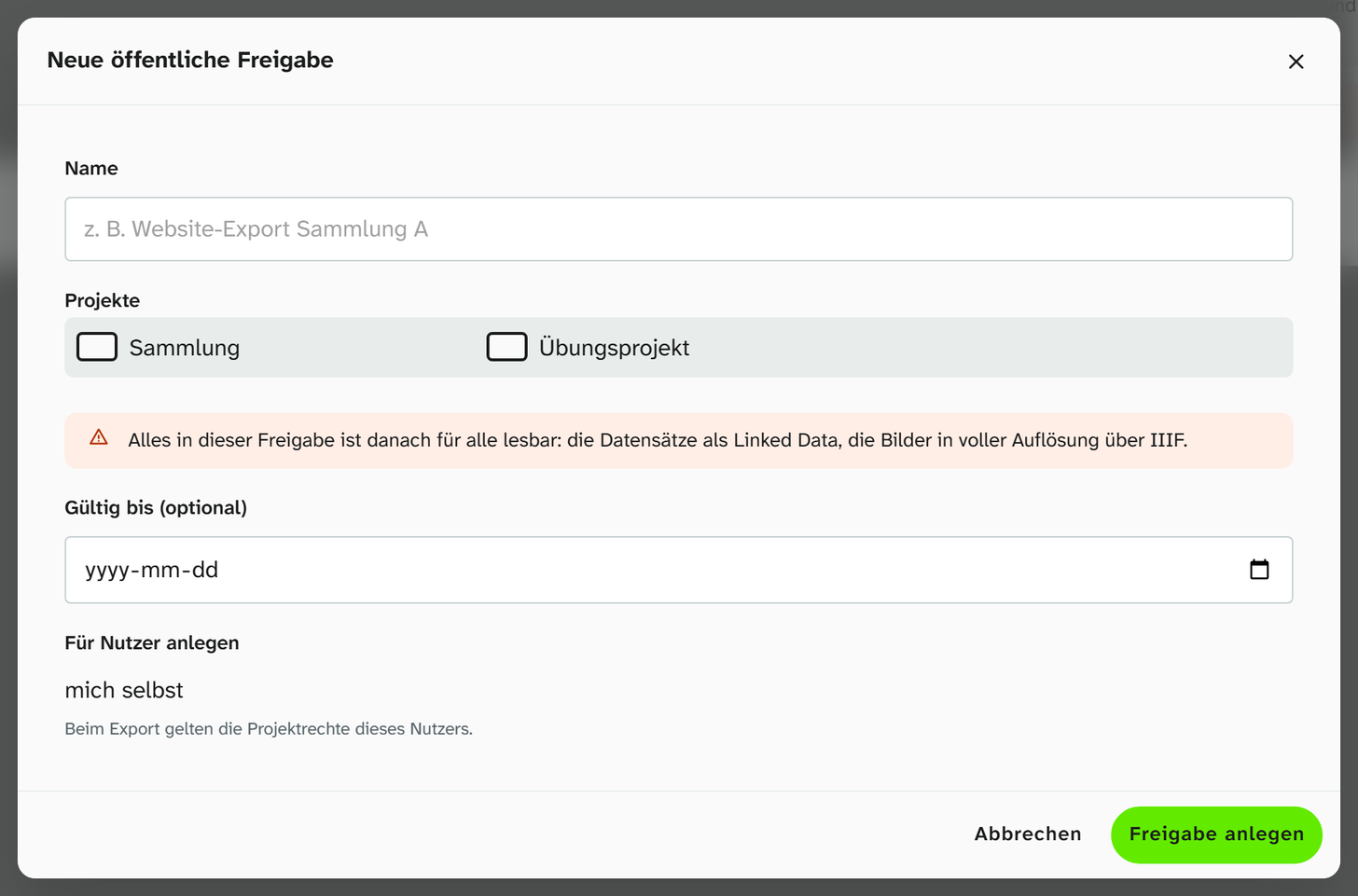
The dialog warns that everything in the share then becomes readable by anyone. In the list you can revoke or delete a share. Either ends publication. An older share that was saved as private appears in the list as private, delivers nothing. A share with an end date shows valid until with the date.

What is published
A share sees the data with the permissions of the account it belongs to. Whatever this account may not read does not go out either. If the account loses a permission or expires, the same applies to the share.
| What | When it is public |
|---|---|
| Object | It is in one of the share’s projects |
| Fields | Only the file, text and calendar fields that the share’s account has chosen in its view settings . Comments and colours on the field never go out |
| Event | It is attached to a public object, and the account may read the event type |
| File, image | It sits in one of the chosen file fields of a public object |
| Authority data | With their identifiers from GND, Wikidata or Getty. Concepts from your own in-house list get an address of their own |
| Person from the address book | Never, see below |
What an object says in the Linked Data document follows its mappings to concepts , just as in an export.
Persons from the address book
Persons from the address book never appear by name in a share and have no public address. If a person is connected to an authority record, the public data of the object or event points to that record (GND, Wikidata or a concept from the in-house list), with its name. Without an authority record the person is missing from the public data altogether. This applies to address fields, links into the address book and actors in events, and equally to the export to Linked Art in the browser.
Images
Moliri only hands out originals and preview images to logged-in accounts with read permission on the file. The images of publicly shared objects are the exception and can be retrieved by anyone.
Addresses
All addresses begin with the base URI, in this example https://sammlung.museum.de.
| Address | Contents |
|---|---|
…/id/object/42 | The permanent address of object 42. It redirects to its document |
…/ld/object/42 | The document: JSON-LD following the Linked Art profile for programs, a plain page for the browser. …/ld/object/42.jsonld always returns JSON-LD |
…/id/event/…, …/id/file/…, …/id/concept/… | The same for events, files and concepts from the in-house list |
…/ld/dump | Description of the full dump with the files moliri-ld.jsonld.gz (JSON-LD) and moliri-ld.nt.gz (N-Triples) |
…/ld/changes | Change feed following IIIF Change Discovery: new, changed and deleted records. It names the full dump, so that an aggregator loads it once and then only follows the feed |
…/iiif/manifest/42 | IIIF manifest of the object (Presentation API 3.0), only for objects with an image |
…/iiif/collection/902 | IIIF collection of project 902 |
…/iiif/collection | Overview of the collections |
Anything that is not public answers with “not found” (404), and so does every one of these addresses as long as no base URI is set.
The manifest contains the object’s details from its mappings, the hotspots as annotations and
a 3D model as a reference. The images are served following IIIF Image API 3.0 (level 0), so that an
IIIF viewer such as Mirador shows them at full resolution. On an open object the IIIF button leads to the manifest. In the LIDO export, linkResource and the preview image also point to the public IIIF address.
When changes appear
| Change | Effect |
|---|---|
| Data of a public object | The documents are updated about every minute |
| Share created, revoked, deleted or expired | The addresses answer accordingly at once, and the documents follow at the next run |
| Full dump | Rewritten every night. Before the first run …/ld/dump answers with 404 |
The instance sets up the runs when it starts, provided a base URI is set. See Operation .
Not to be confused with
| Feature | What it does |
|---|---|
| Saved view Make available to all users | Makes a view with filters visible to all accounts of the instance. Has nothing to do with shares. See Saving a view |
| Sharing an Excel export preset | Makes a field selection available to all accounts |
| Exporting the calendar as an ICS file | A one-off file, not a subscription |
| Excel export , JSON export, metadata standards | Output data as a file, for example for exchange with other systems |
| Licence and licence holder on the file | Information about the image, not a sharing status. Publication happens through the share of the object |