
Profile
AI overview
The AI overview page in the profile shows everything in Moliri that works with artificial intelligence on a single page: which model it is, where it runs, whether the data leaves the house in the process and where it goes, how large a download is and what it is used for. Everyone can see the page, including an account that may only read.
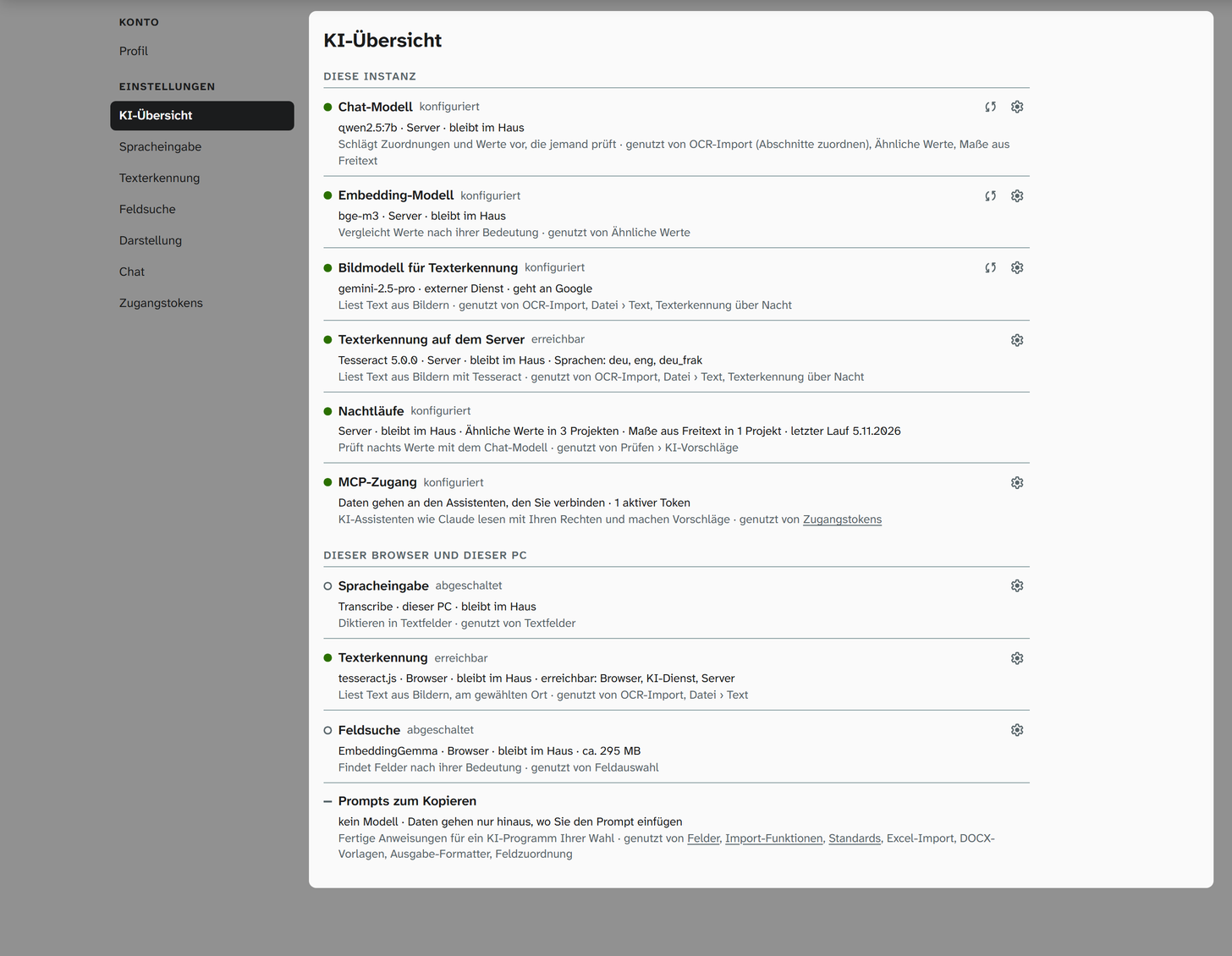
Layout
The page has two sections:
| Section | What it contains |
|---|---|
| This instance | What the server provides for everyone: Chat model, Embedding model, Image model for text recognition, Text recognition on the server, Nightly runs and your own MCP access |
| This browser and this PC | What you have set up for yourself: Speech input, Text recognition, Field search and the Prompts to copy |
Each row starts with a dot for the state, the name and the state in words. Below that are the model, the place, whether the data stays in the house, for models in the browser the size of the download, and further details such as the languages or the number of projects. The last line gives the purpose and the places in Moliri that use the function. The cog on the right leads to the setting.
States
| State | Meaning |
|---|---|
| configured | Set up and ready. Only Test connection shows whether the service really answers |
| downloaded | The model is stored in this browser or in Transcribe and does not need to be downloaded again |
| reachable | The service has just answered |
| not reachable | The service did not answer, for example because Transcribe is not running on this computer |
| not set up | A model, a service or a token is missing |
| switched off | Set up, but switched off, in the profile or by the instance |
A green dot stands for configured, downloaded and reachable, an orange one for not reachable, an empty circle for not set up and switched off. The Prompts to copy have no state, because there is no model behind them.
Place and house
The place is browser, this PC (for example Transcribe on this computer), server or external service. Next to it is stays in the house or goes to with the provider, for example goes to Google.
Moliri derives this from the address of the service. The following count as in the house: your own computer (localhost), addresses from private networks and names without a dot, as services on your own server have them. Everything else counts as external. The models in the browser (Whisper for speech input, EmbeddingGemma for the field search, tesseract.js for text recognition) always run in the house, ElevenLabs for speech input always externally.
If the instance’s model runs behind a proxy, the address can be misleading. The administration then sets per account in the settings under AI account whether it runs in the house.
Two rows say where data goes instead of naming the place: MCP access sends it to the assistant you connect with an access token , and the Prompts to copy only send it where you paste a copied prompt.
What the page checks
When you open it, the page checks everything that costs nothing: the settings, whether a model is already stored in the browser, whether Transcribe answers on this computer, whether text recognition on the server answers, the nightly runs in the projects you may read, and your active access tokens. It does not send a request to any model while doing so.
For the instance’s accounts (Chat model, Embedding model, Image model for text recognition), the page also shows administrators (status 9) the Test connection button with the two arrows. It sends a small request to the model, like Test connection on the AI account page, and shows the response time or the provider’s message.
What other accounts see
Anyone who is not an administrator sees the model name, the place and whether the data leaves the house for the instance’s accounts, but no addresses and no keys. The cog for the instance’s settings and Test connection are then missing.
Further reading
- Profile : all pages of the profile
- AI account : setting up the instance’s language model
- Speech input , Text recognition , Field search : the settings of this browser
- Access tokens : connecting AI assistants via MCP