
Libraries
Maintain addresses
Lenders, insurers, shipping companies and workshops are entered once in the address book and are then simply selected in the object. The address book applies to the whole instance. The usual way is to search in the field and create a new entry only when needed, rather than filling the address book in advance.
From an address field
-
Click into the address field. The Address dialog opens.
-
Search. The search covers name, place, person and function.
-
Choose a match. If there is none: New address.
-
For a new address, enter the name and type, then create the person who is to appear in the field.
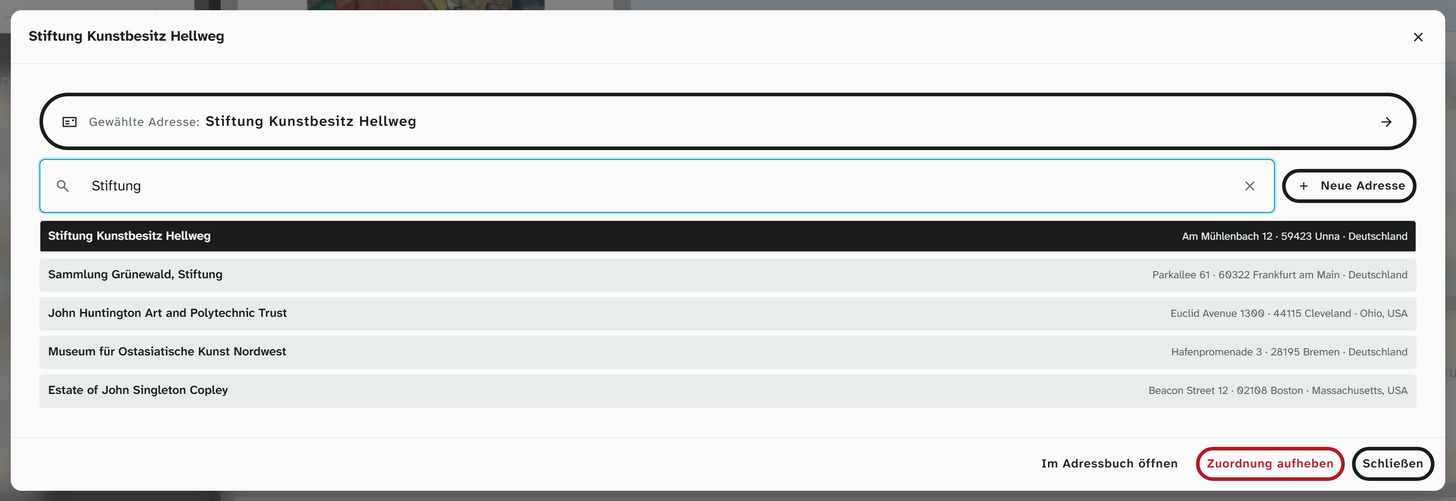
If exactly one address type is set up for the field, for example Lender, it is already filled in when you create an entry. The setting itself is part of the field’s setup.
Open in address book jumps to the selected entry, Remove assignment clears the field.
In the address book
Under Libraries › Addresses (status 9) you can tidy up entries at leisure, clean up duplicates and maintain postal addresses.
Address and person
| Level | What belongs there |
|---|---|
| Address | The organisation: name, type, up to three postal addresses |
| Person | Salutation, title, first name, surname, function, contact details |
An address field points to a person and so also provides the postal address of their organisation. A private individual who lends a work is created as an address with one person. The name of the address is then their name.
The three postal addresses
They cover the usual case: post, invoices, deliveries. The Type is free text, and your institution decides on the naming. Which postal address appears in a loan agreement is determined by the Word template.
Salutation and function
Both suggest what already occurs in the address book. This gives a consistent spelling without anyone having to maintain a list. Letterheads and agreements need the Salutation. Keep it up to date, even if it seems unimportant while you are entering data.
Permissions
| Action | Permission |
|---|---|
| Select in the field | Write access to the field |
| Create and change an address or person | Status 6 |
| Address book under Libraries | Status 9 |
Before deleting
Before you delete a person, Moliri shows in how many objects they are linked (Person is linked in n objects). Deleting clears these fields.
A lender who no longer exists is better left in place. Old agreements and objects refer to them. Note in the annotation what has changed, for example collection dissolved, holdings passed to ….
Further reading
- Address book : all details
- Address : the field type
- Resolve references : assign lenders from an import column