
Organise
Search
Moliri has three searches. If you mix them up, it usually seems as if the search finds nothing.
| If you … | then … |
|---|---|
| want to open a particular object | Quick search |
| want to narrow the selection down to a term | Full-text search |
| need a precise selection | Detailed search |
Quick search
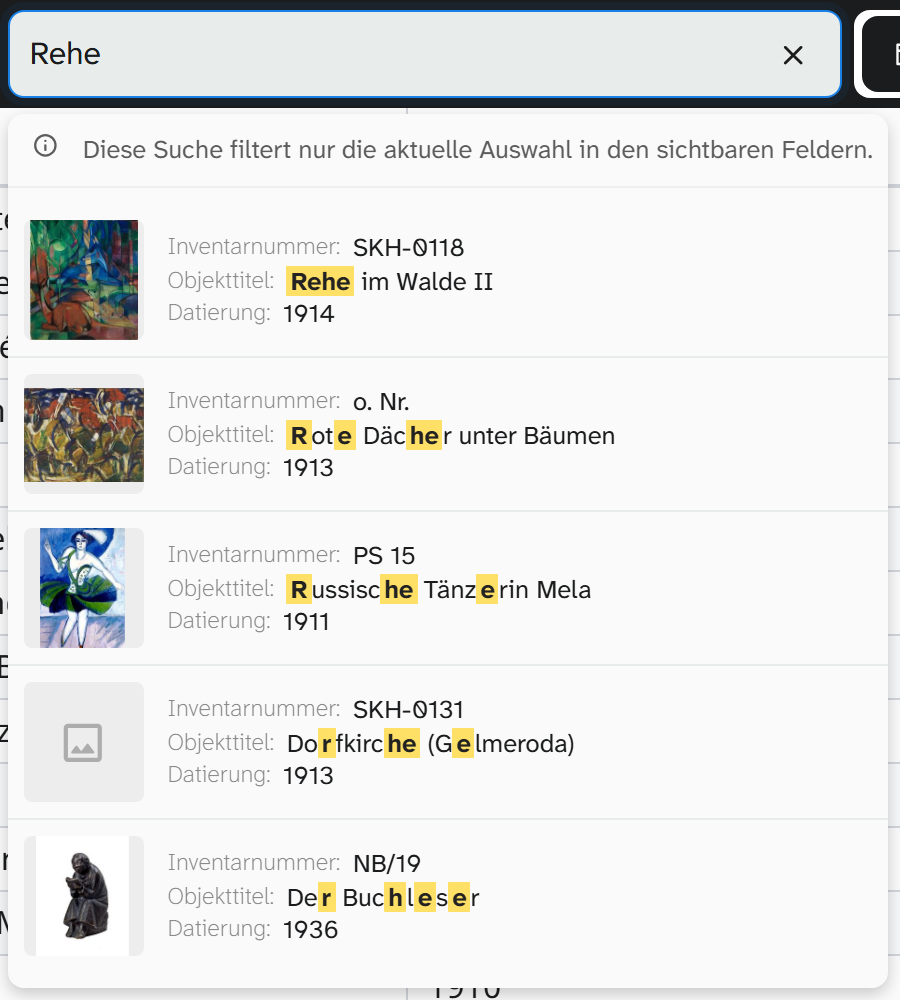
The field Quick search … in the middle of the project header, in front of the view buttons.
- Searches the text fields of the view settings, plus the object number and the first grouping field
- Searches fuzzily, so typing errors are forgiven
- Shows up to ten hits in a list, highlighted in yellow. A click opens the object
- Does not change the object selection. Gallery and table stay as they are
Meant for finding and opening an object again, not for narrowing down.
Full-text search
In the Filter tab of the sidebar. It searches the selected Search scope and changes the selection.
Example: without exact comparison, kauf finds Verkauft, Verkäuflich and Kauffrau; with exact
comparison only Verkauft.
| Search scope | Effect |
|---|---|
| Fields | The values of all fields. Default |
| Metadata | Comment and source on the fields, so also doubts that have been noted |
| Events | The objects’ linked events, such as a loan with the people involved |
| Image metadata | File details such as description, keywords, creator, copyright |
| Transcripts and OCR | The transcripts of audio and video and the recognised text of images, in the file manager and in file fields |
| Links | The linked authority data, people from the address book, objects and files. The search also finds a person by their role, address label and place, for example Privatsammlung Seelow or Lübeck. Default as for Fields |
The Aa icon switches on the exact comparison: upper and lower case and umlauts then have to match.
Space, tab and line break count as the same: Öl auf Leinwand also finds a value with a line break after Öl, and pressing Enter after the search term does not change the result. With the exact comparison, every character counts as typed; that way you can also search for a line break.
If the search term contains invisible characters that the search does not treat as a space, such as a non-breaking space from copied text, a note below the search field names them. Remove takes them out of the search term. With the exact comparison, the note also names line breaks, tabs and spaces at the start or end.
Hits in transcripts and recognised text
With Transcripts and OCR, the search also finds a name in a scanned letter or in a conversation. The list of hits on the object preview then names the file and shows the passage in the text, for a transcript with the time. Clicking the time opens the recording in the Transcript tab: the player is at that point, the search term is in the transcript’s search and the hit is highlighted. A hit in the recognised text opens the file.
Search by meaning
The By meaning switch below the search box does not search for the letters but for what is meant. Vessels for liquids finds jugs and amphorae, woman with dog finds a peasant girl with a dog, even when the texts are in English. The query is compared with the overall text of each object: the fields that everyone in the project may read, such as title, description and keywords.
- The selection shows the 50 best-matching objects, the best first. The view’s sorting is suspended in the meantime: its rules are greyed out under Sorting, and a note above them says so. A grouping stays, and within each group the best hits come first
- The icon on the object preview names the field that matches best, with the beginning of its text
- The search scope and the exact comparison do not apply here
- The 50 can include objects that do not fit: the search always shows the best, never only the certain ones
For this to work, a language model on your own server reads the texts of the objects once. No text leaves the server in the process. If a project has not been prepared yet, the switch searches the full text instead and says so below the search box.
Preparation below the search box shows how many texts still have to be read in and roughly how long that will take. Anyone who may write in the project can start a run there: a trial run with 200 texts, or the nightly run that reads in new and changed texts. Text, select and keyword fields and the labels of authority data are read in, but not numbers, dates and inventory numbers. The background jobs dialog also shows the progress.
Detailed search
For everything a single search term cannot do: comparisons, empty fields, combinations, regular expressions. See Filter objects .
You can search by meaning here as well, but only in one field: if you choose, say, Objektbeschreibung (object description) and the comparison Meaning, vessel for wine finds the objects whose description means that. The row can be combined with other conditions using AND and OR.
When a search finds nothing
| Observation | Cause |
|---|---|
| Quick search finds nothing, full-text search does | The field is not among the text fields of the view settings |
| Full-text search does not find a comment | Search scope Metadata is off |
| Full-text search finds nothing | Exact comparison is on, or the term is in an event (switch on search scope Events) |
| A word from an interview or a scan is not found | Search scope Transcripts and OCR is off, or the file does not have a transcript or recognised text yet |
| A linked person is not found by their phone number or street | Contact details are not part of the full text of the links. They are found through an address field |
| An object is missing despite a hit | Another filter or the Wahl filter excludes it |
| A number is not found | You have to search for the stored value, without formatting and unit |
| By meaning does not find an object that fits | Its texts have not been read in yet (Preparation), or 50 others fit better. For a single word, the full-text search is often more precise |
| Below By meaning it says the full text was searched | The project has not been prepared yet, or the service with the language model is not responding at the moment |
Further reading
- Filters : the complete reference
- View settings : what the quick search searches in
- Live camera : find objects by QR code, barcode or inventory number